24.1 Create
Some professionals, like graphic designers or software developers, are expected to have an online portfolio showcasing their work and skills. Product managers, however, aren't typically expected to provide a portfolio during the interview process. Nevertheless, having a digital artifact that you can share with a potential employer is a good idea. It can be a great networking tool, prepare you for the odd company that might request to see proof of your skills, and will definitely help you stand out, especially if you have no prior experience in a product role.
Communicating about projects you've completed is a kind of art form. As a product manager, you need to know all the ins and outs of your projects. But potential employers and networking contacts won't be motivated to go through your entire project history in detail. To put it bluntly, no hiring manager is going to want to watch the hour-long video of your capstone presentation (though they will likely have you present to them live during the interview process).
To create the PM equivalent of an effective portfolio, you'll need a quick and succinct way to communicate your capabilities and previous work. What kind of projects should you share? How will you capture your audience's attention? How long should it be? In this checkpoint, you'll learn the answers to these questions, and plan which project story you want to share. In the following checkpoint, you'll learn where and when to share this work.
By the end of this checkpoint, you should be able to do the following:
- Outline objectives for your first PM portfolio piece

What to share
The first decision you need to make is which projects to share that best showcase your product management skills. The good news is that you should already have a few in mind from your assignments in this program. Think back on all the assignments and capstones you completed, but don't stop there. You can also consider projects from both your professional and personal life; anything that highlights skills you want an employer to see is a good choice.
Great project examples might not even be things you think of as work, such as volunteering or participating in a local hackathon. Even a personal project where you brainstormed and prototyped a product, whether physical or software, could be a great portfolio choice. Focus on projects where you can show your product management readiness. Did you succinctly identify a user problem? Did you find a creative way to address a problem? Did you test a minimal solution before committing a lot of resources to the problem? Did you deliver impressive results?
One other consideration to keep in mind when choosing projects is what images you might be able to include. Adding a photo like the one below will make the summary of your project look more interesting and demonstrate your experience working collaboratively on user journeys:
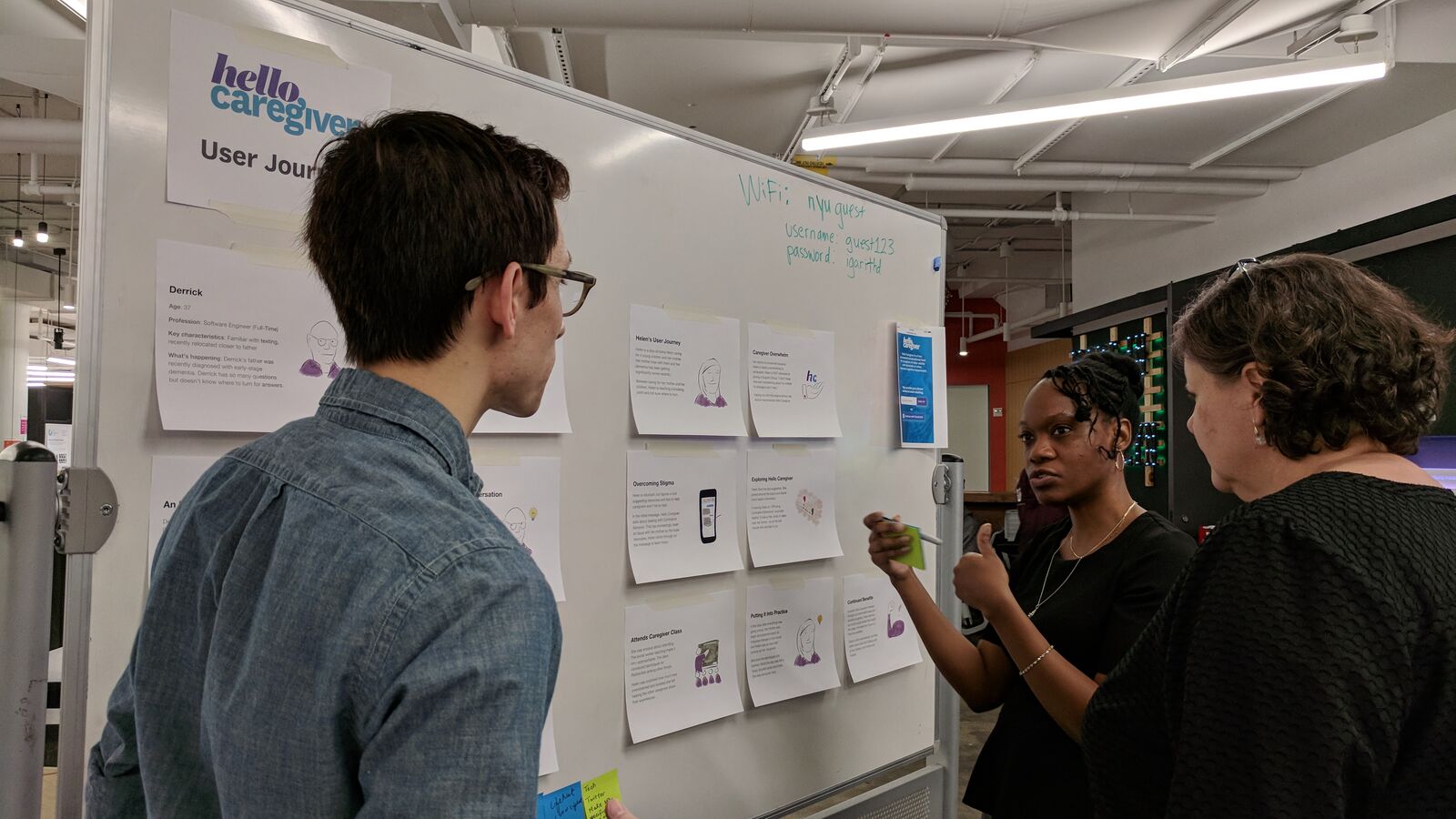
So, make sure you snap those photos during product-related events (such as user testing), and be sure to ask anyone captured for written permission to use their image. Similarly, if your project was focused on data analysis, you'll want to include some graphs you developed using your Tableau skills. A project with good visuals is a better choice than a project with limited visual potential.
Now that you have some ideas for which projects you might want to highlight, it's time to think about how to most effectively communicate them to the world.
How to share projects
To share your projects effectively, you'll need to channel your inner marketing/sales person. Your goal is to create a brief and engaging summary of your project. You can think of this as a portfolio equivalent of your 30-second elevator pitch. The objective is not to communicate every detail or even provide a summary of the project; the objective is to highlight what you accomplished and what you can do, so that the reader will want to know more about you.
Use communication skills
In sharing project summaries, you're going to be leveraging the same communication skills you developed for the purpose of delivering presentations. But instead of tailoring your message to a specific audience, your PM portfolio will target a wide audience. If you know you want to work in a specific industry, like gaming or medical products, you should consider narrowing down your message somewhat. However, while you're initially getting established in product management it's advantageous to cast a fairly wide net.
Consider a limited number (one to three) of fundamental takeaways you'd want people to remember after checking out your project summary. You might want to include the following features:
- Your results, or the positive impact your actions had on a business or project
- Your expertise in a specific industry
- Your hands-on experience working with end users
- Your ability to analyze data and turn it into actionable insights
- Your innovative mindset and creativity in the face of a well-defined problem
Be clear about your objectives. Write them down. Doing so will help keep you focused.
Keep it short
You're excited about your projects, but the harsh truth is that most of your audience won't be. To get them interested, you must keep it short and skimmable. Remember, your project summaries don't need to tell the whole story. They only need to convince your audience that you are worth a second look or longer conversation. The ideal length is usually 100 to 200 words. Yep, that short!
Use storytelling
Your project summary is a story you tell about your abilities and experience. Use those storytelling muscles you've been flexing throughout this program. Make sure your summary has a story arc. Like a story in three acts, this usually involves three parts.
You can see such story structures in action in many case studies that companies publish to advertise their services. For example, the educational technology company Six Red Marbles uses a "What we did, how we did it, the result" structure for their case studies. Design consulting giant IDEO succinctly summarizes their design work upfront in terms of "the challenge, the outcome." For product managers, the best story structure to use has the following elements:
- The problem
- Your actions
- The impact you had (the results)
For an example of what this could look like, check out this sample project summary:
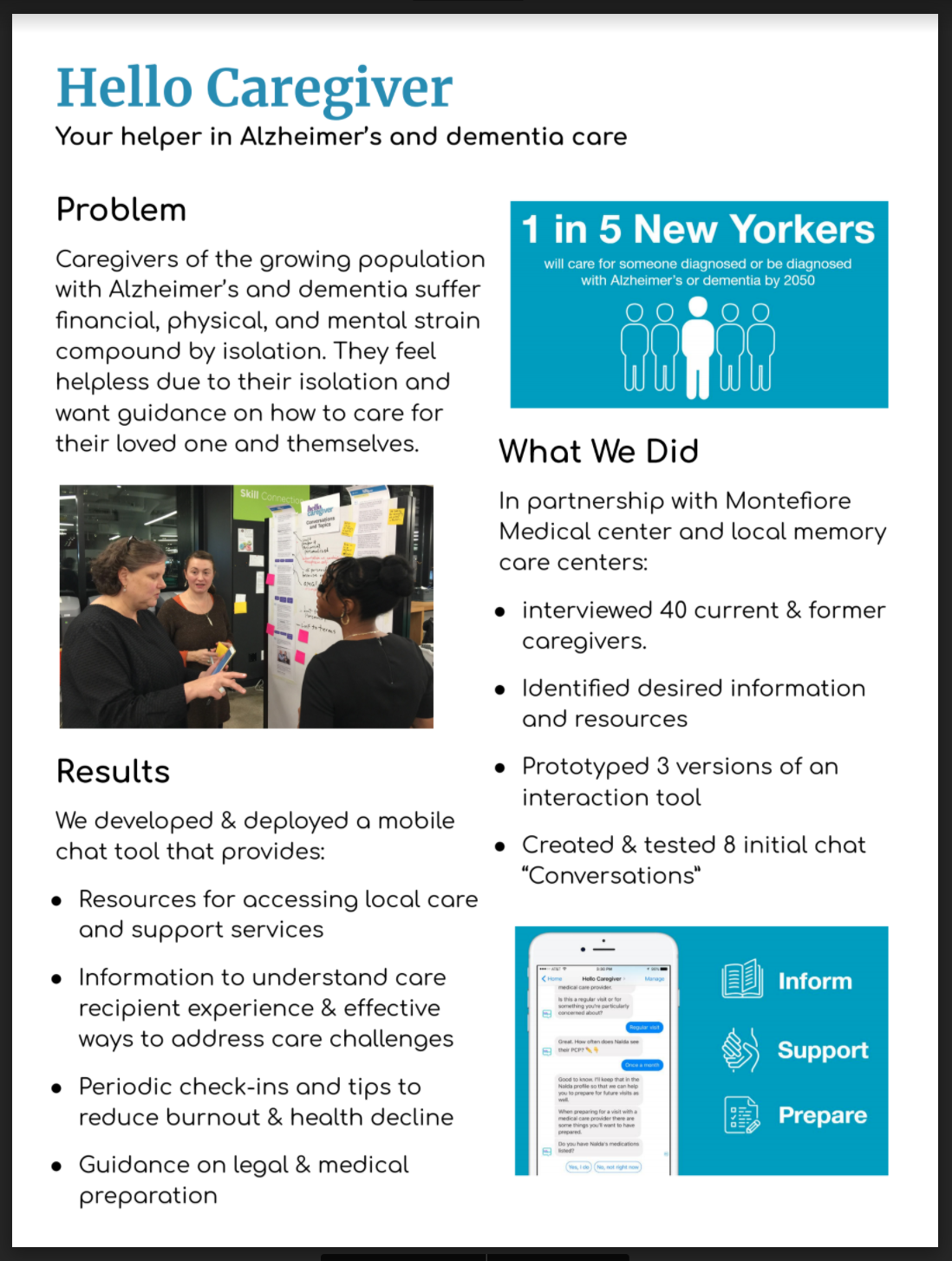
This summary is of an app that was designed and developed as part of a social impact technology fellowship with Robin Hood's Blue Ridge Labs. While the summary doesn't go into all the details, it communicates enough about the project in one page to pique a reader's interest.
Use buzzwords with caution
Technology or business terms like "revenue model" or "A/B testing" might come up while you're describing your projects. This is your chance to make it clear that you are already thinking like a product professional. But be careful. Avoid going over the top with the use of buzzwords or jargon. Spell out most acronyms on first use, and don't use jargon terms unless they make sense in context. Most importantly, make sure you know what a term means before you include it. Google is your friend here.
Make it visual
As mentioned above, it is recommended you support the story you're telling with engaging images. See the following list for some ideas of good visuals to use.
- A photo of a user in the frustrating circumstance your project addressed
- A whiteboard sketch from your initial brainstorming session
- A graph presenting data analysis results
- Mockups from a user interview with handwritten notes on them
- A polished photo of the final product
Some examples include the Hello Caregiver one-page summary above, and the Six Red Marbles case studies, which do a great job of summarizing their work and including images in a way that makes even printed educational materials look exciting.
Don't get in trouble
Sharing work products can be tricky. Make sure anything you plan to include in your PM portfolio is okay to use. Don't use images that might be subject to copyright, such as images you found online. Similarly, you might need to check with your employer if you want to share details about a project you completed at work. And if you signed a nondisclosure agreement or can't meaningfully describe the project without exposing proprietary information, some projects might be off-limits.
Use your best judgment, and get creative where appropriate. Even presentation slides can add some color to a project summary. Photos with individuals can be cropped to show only their hands making notes on a whiteboard. Ask people in your pictures for permission to use their images, and if you don't know them well, have them sign a generic media release form.
Practice ✍️
Brainstorm and make a list of all of the possible projects you've completed that could be used in a PM portfolio. Remember to think widely and consider all of the personal, professional, academic, volunteer, and PMcademy projects you've completed. It's best to limit yourself to something recent (from the last year or two), but if there's something compelling in your past that you now realize makes you look like a great PM candidate, you can break that rule. If you have no ideas, start with the three capstone projects you've completed at PMcademy so far.
Have your list? Great. Now narrow it down to the two or three best options. For each of these top projects, list one to three objectives or skills you think it showcases about you (such as "delivered impressive measurable results" or "used data to make decisions"). These will guide your work in the next assignment, when you develop your project summaries further.
Below, share a link to a document containing both your original brainstorming list and the objectives for your top ideas.