1.1 Join Slack Community 🎯
This section includes an Activity 🎯. Sections marked with a 🎯 are the one's that have an activity in them.
Even though the PMcademy experience is remote, that doesn’t mean that you’re alone. More than anything, PMcademy is a community of like-minded learners and professionals connecting to talk about and collaborate on a set of professional skills.
The messaging application Slack serves as a public space where members of the PMcademy community communicate. This is where you can collaborate with fellow learners who are tackling the same assignments you are, learn about local events, and make valuable professional contacts.
Slack is also a great application to get comfortable with, since there are currently 102,000 companies that use Slack, and the majority of them are tech companies. There’s a good chance you will use Slack daily once you’re working as a product manager.

By the end of this checkpoint, you should be able to do the following:
- Sign up for and install Slack
- Join Slack channels
- Optimally configure your Slack notification settings
- Familiarize yourself with our Slack community guidelines
Let's get Slacking!
Sign up and say hello
- Check the Activity 🎯 below and follow the steps to join our community.
- Create your profile. You’ll be prompted to provide your name, handle, and other basic information. You will also be given options to download the mobile and desktop apps; we recommend that you download both.
- Join your program channel(s) and any local groups.
- Read the information in #01-announcements
- Say hello. Don’t be shy. Post a short, 1-2 sentence Slack message in your program channel introducing yourself in the channel #02-new-learner-intros
- Lastly update your linkedIn profile. See activity below.
👉 Use the following template if you like to be more engaging in your intros rather than just posting one liners.
- Hey I'm [Name] from [Country] currently [Your Employment status, working in/student at]

Then answer atleast two of the 3 questions (or all) in your intros
- Why did you join this community and what are you looking to get out of this?
- How do you plan to stay committed in completing the bootcamp ?
- One fun thing about you that we should all know.

Share your LinkedIn profile making it easier to connect with fellow learners
Optimize your notifications
We recommend setting up Slack on your desktop and mobile devices, but you don’t want to be drowning in a sea of irrelevant notifications. Here’s how to get some sane default notification settings.
- In the top-left corner of the Slack app, click on your name, then Preferences.
- Ensure that Direct messages, mentions & keywords is selected. If it’s not, select it as your preference.
- If you’d like to mute all notifications at some point, you can do this by clicking on the bell icon to the right of your name. This can be helpful when you want to concentrate.
You're now set up on Slack! If you’d like more help or tips, Slack has a great help site with lots of easy-to-understand articles. You can also email hello@pmcademy.com if you’d like more support getting set up.
Contributing to the conversation
Finally, our Slack community is awesome. Why? Because it’s a vibrant community where people support and respect each other. These are the guidelines that we expect everyone in our Slack community to follow:
- Be helpful, not hurtful. No harassment of any kind is tolerated. Ensure that what you post is respectful before it’s posted.
- Do not make offensive or derogatory comments related to physical appearance, body size, age, race, language, national origin, ethnic origin, nationality, immigration status, religion or lack thereof, gender, gender identity and expression, sexual orientation, (dis)ability, mental health, or similar identifying traits.
- Do not question or challenge the way that someone self-identifies or self-expresses.
- Do not post unwelcome (or uninvited) comments or opinions regarding a person’s choices and lifestyle practices.
- Do not make general statements or public assumptions about groups that you don’t belong to or know much about.
- Be mindful of the many voices in the community to ensure that there’s room for everyone who wishes to engage in the conversation.
- If you read something that offends you, explain why and move on. If you feel that something is really hurtful or violates these group guidelines, email the group administrator.
- Do not promote any paid or free event, course or product with the approval from our team at hello@pmcademy.com
- Do not seek public advocacy for participants to be banned. To address specific concerns, email hello@pmcademy.com
- Do not send excessive direct messages to anyone in our community, and do not harass people who don’t respond to messages.
- Do not post sales pitches of any kind. If you would like to sell something, speak with our team before you offer services. All job offers or job listings may be posted to the respective channel.
- Remember that you’re on the internet; any information that you don’t want to spread outside the group should not be posted to the group.
Happy Slacking! Time to get in there and make some new friends and professional contacts.
Activity 🎯
Get your unique Slack link from our team at hello@pmcademy.com. As a memeber, once you pay you should ideally automatically get the slack link joining email, but incase you haven't reach out to us. Then, Introduce yourself to your peers in the slack channel #02-new-learner-intros
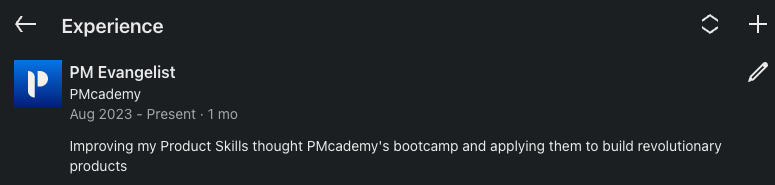
Update your LinkedIn profile to let others know about your new learning adventure. You can find us in the Experience section on LinkedIn and add "Student", "Learner", "Apprentice", "PM Evangelist" . . .whichever makes you feel comfortable.
See the example image below
- And offcourse, don't forget to follow us on and stay updated with all things related to Product
Once you’ve completed these steps move on to reading our Code of Conduct.