9.2 Prioritization Features 🎯
This section includes an Activity 🎯
Deciding what to work on next is one of the most important tasks you'll have as a product manager. Whether you're building a roadmap or deciding on the scope of a feature that is going to be part of the roadmap, you'll constantly have to make decisions about what will make the cut and what won't. You will need to consider many factors, from how much value a certain feature will add for your users to how complex it is to build. Often, you will have limited resources (like time, budget, or team members) and will need to make tough choices.
In this checkpoint, you will consider different methods for prioritizing your roadmap items.
By the end of this checkpoint, you should be able to do the following:
- Describe at least two different prioritization methods
- Use a prioritization method to sort out your roadmaps
Why prioritize?
It's your responsibility as PM to keep everyone—your team, stakeholders, and sometimes even customers—aligned on what's coming up next. This is especially important for your developers and designers. They need to know what they're working on now and what's coming next—and often there could be dependencies between these features.
For example, if you're adding PayPal and Bitcoin payment options on your e-commerce site, your designers will want to know all the payment options that will eventually be present so they can design the page once with all the features in their final location. Otherwise, they'll have to redesign it for every new payment option you add, which will take up a lot of their time and energy unnecessarily.
Similarly, your stakeholders should know what's next. They'll especially want to have a say in the next items you're working on. And they'll need to know what's coming in order to prepare communications, sales, and other customer-facing aspects appropriately.

Benefits of prioritizing
Prioritizing is not just essential for others on your team and in your company. It is also extremely beneficial for you. When you prioritize, the following benefits emerge.
Know what to cut
No project goes according to plan. You'll often have to make decisions about what to cut as often as you will about what to put in. When you have a prioritized list of what's most important, it's easier to make these cuts when necessary by just cutting items off the bottom of the list.
Helps you handle interruptions
When your boss asks you to stop what you're working on and get started on a new button for your app because "the CEO said so," having a prioritized list of features helps you organize and track how these interruptions will impact your roadmap. If the interruption is substantial and valid, you even have the option to throw away your roadmap and start from scratch. In either case, having a prioritized list will allow you to communicate to your supervisors what the impact is and better advocate for your own priorities.
You can win with less than you think
One of the lessons of MVP-thinking is that your users will often be happy enough with a bare minimum of a feature instead of a full feature with all the bells and whistles. If you prioritize and ship as features are complete, you'll be surprised at how the majority of your users will be satisfied with just the first few items you do. This means that you can do the other items later. Therefore, it's crucial to make sure that the right features are developed first. If you choose right, you may satisfy your user base and solve their problems without additional time and effort.
Weaving in small things
There's often downtime for your developers and designers while they're working on projects. Your designers may be on pause waiting for feedback, or your developers may be waiting on code reviews. If you prioritize small features alongside the big ones, your team can pick them up when they have extra time. It's an effective and efficient way to make progress if you prioritize appropriately.
Ensuring your work aligns to your KPIs and goals
Most likely, you'll be working in an organization where you'll have a list of goals or outcomes that you're expected to achieve. You should be able to review your prioritized list of next steps to ensure that they are in line with those goals. If any of your work is not tied to one of your goals, you should probably cut it from your list or change your goals accordingly.

Prioritization factors
Even though there are many ways to prioritize items, certain common items will frequently come up. A good place to start your prioritization is with the following categories.
Strategic items
Most of the items that you'll be prioritizing high on your roadmaps will be the shiny features that help you accomplish your company's strategic goals. So when you're working on a company KPI of increasing the average session length of viewers on your video website, you should prioritize "recommended videos list" much higher over "share this with a friend." Sharing could increase your user base, but a recommended videos list is more likely to directly impact session length. A focus on strategy will help you keep the most impactful items front and center.
Big wins
In general, you should consider the item's impact when deciding what to focus on. Try to prioritize high impact items over smaller impact ones. If you're trying to increase session length and have a choice between working on video recommendations or autoplaying the next video, consider which one you think would have the biggest impact. These choices aren't always easy, but if you do your research and talk to your users, you'll be able to make an informed decision.
Have-to-do items
Many times you'll be forced to take on specific items. This is especially common in B2B products where sales can be contingent on adding a specific feature to your product, such as adding detailed audit logs for an enterprise client. Ideally, these are features you would want to build anyway, but you'll just have to do them sooner than planned. Sometimes these are features you would not add, but you'll be forced to in order to close a big deal.
Tech debt and upgrades
As your product ages, there will be new technologies that will replace the ones you're using. For example, maybe your product integrates with YouTube for easy video uploads and management. If YouTube changes its methods for uploads, you'll have to make similar changes to your own product. Sometimes these are just patches and updates that are easy to fit in. Sometimes they will require you to overhaul your product to fit them in. You'll have to work with your tech team to figure out what needs to be done, then prioritize this work alongside your other product features.
Small wins
As stated earlier, there's always time to fit in a few small features and updates along with your bigger items and must-dos. Leaving space for a few small items in your roadmap allows you to squeeze in requests by your coworkers or customers that you might not get to otherwise.
MoSCoW prioritization
One method of taking a list of features and prioritizing them is called MoSCoW—an acronym for must, should, could, and won't. Simply put, you take each item you're considering and put it into one of those four categories. Sort the M's at the top, then the S's, C's, and finally W's. If there are any ties, you can shuffle those items up and down as you see fit.
- Musts are the hard requirements that absolutely have to be done. The project will be a success if you get just the M's done.
- Shoulds are items that provide great value but aren't requirements. They're great to do but won't sink the project if they aren't launched.
- Coulds are nice-to-have items; they won't significantly affect the outcome but could be valuable for a few people. They can easily be ignored.
- Won'ts are the items that you will never do under any circumstances. It's an anti-requirement and should be avoided at all costs.
Imagine you were building messaging into Netflix so that people can share movie recommendations with each other on their mobile apps. Here's an example of what your backlog—a to-do list of possible action items—might look like:

To prioritize these with the MoSCoW method, go through and rank each item as M, S, C, or W—perhaps in a spreadsheet tool, as seen below. The following shows a method for ranking these items in Google Sheets.
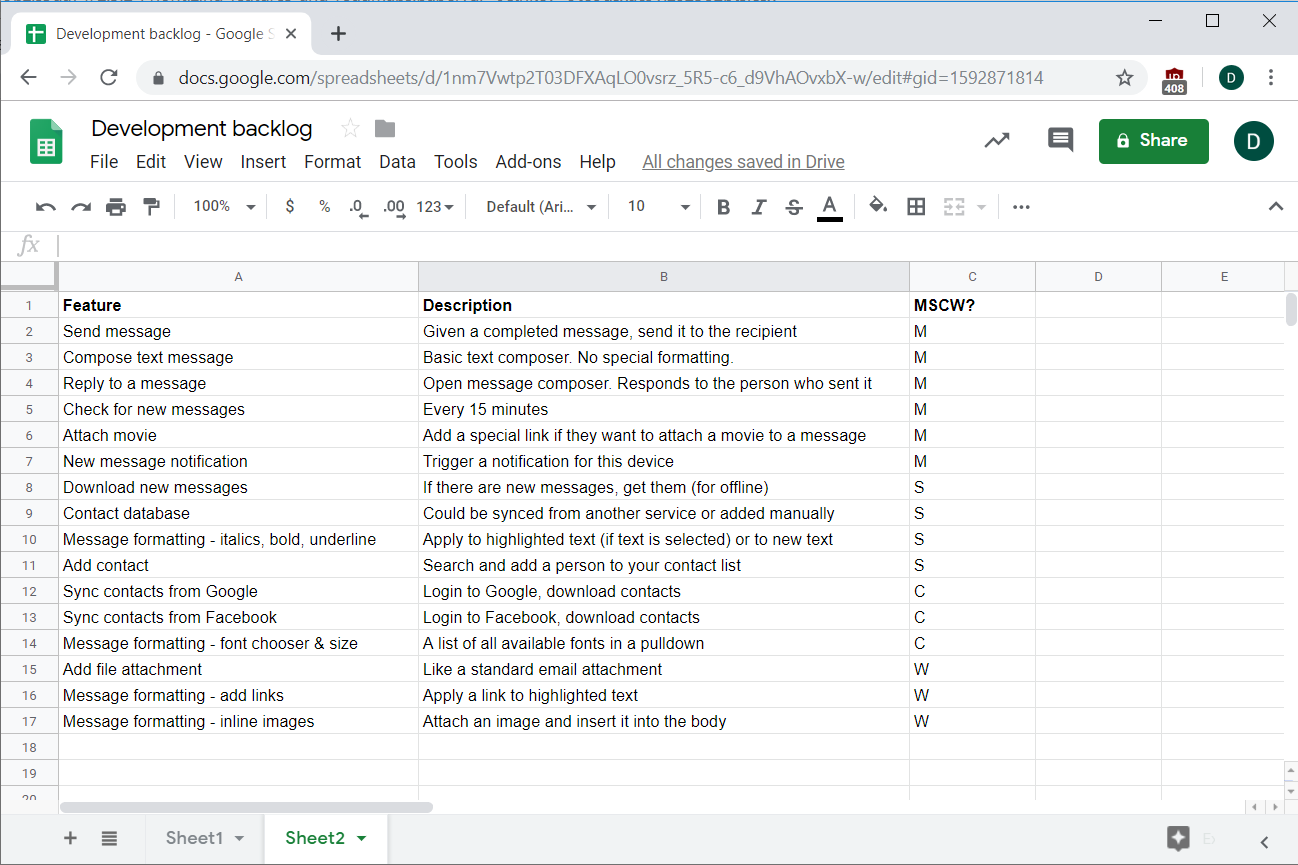
In general, you should have very few musts in your list. This gives your team a clear sense of priority about what they have to do and where they can cut corners. Anything that isn't a must may never be completed, so keep that in mind when you make your list.
It's best to have a story that explains why something is a must. In this case, the musts are just the bare minimum features to write and send a message that has a movie attachment. Anything else like formatting, address books, and the like are nice but not necessary for this.
If your list is really long or some of the decisions are hard, you can add additional criteria to help you prioritize. Consider the following factors:
- Value to your customers
- Benefits to your company
- Effort to build
- Likelihood of success (or conversely, risk)
- Benefit of doing it now versus later
- Dependencies that may affect it
Take some or all of those factors and score them on a 1-5 scale, where 1 is the least beneficial or hardest and 5 is the most beneficial or easiest. Within each of the M, S, C, and W sections, use the total value of the scores to sort within the section. Do one last pass to make sure your priorities look right. Keep in mind that this is just your first pass, so it doesn't have to be perfect. You can work with your stakeholders to refine the list and prioritization.
Don't forget that the scoring method does not negate other considerations, like dependencies between items. For instance, in the image below, note that the Contact database item has a lower total value than some other items in the S group, but it's higher on the priority list because it's a prerequisite for other contact features:
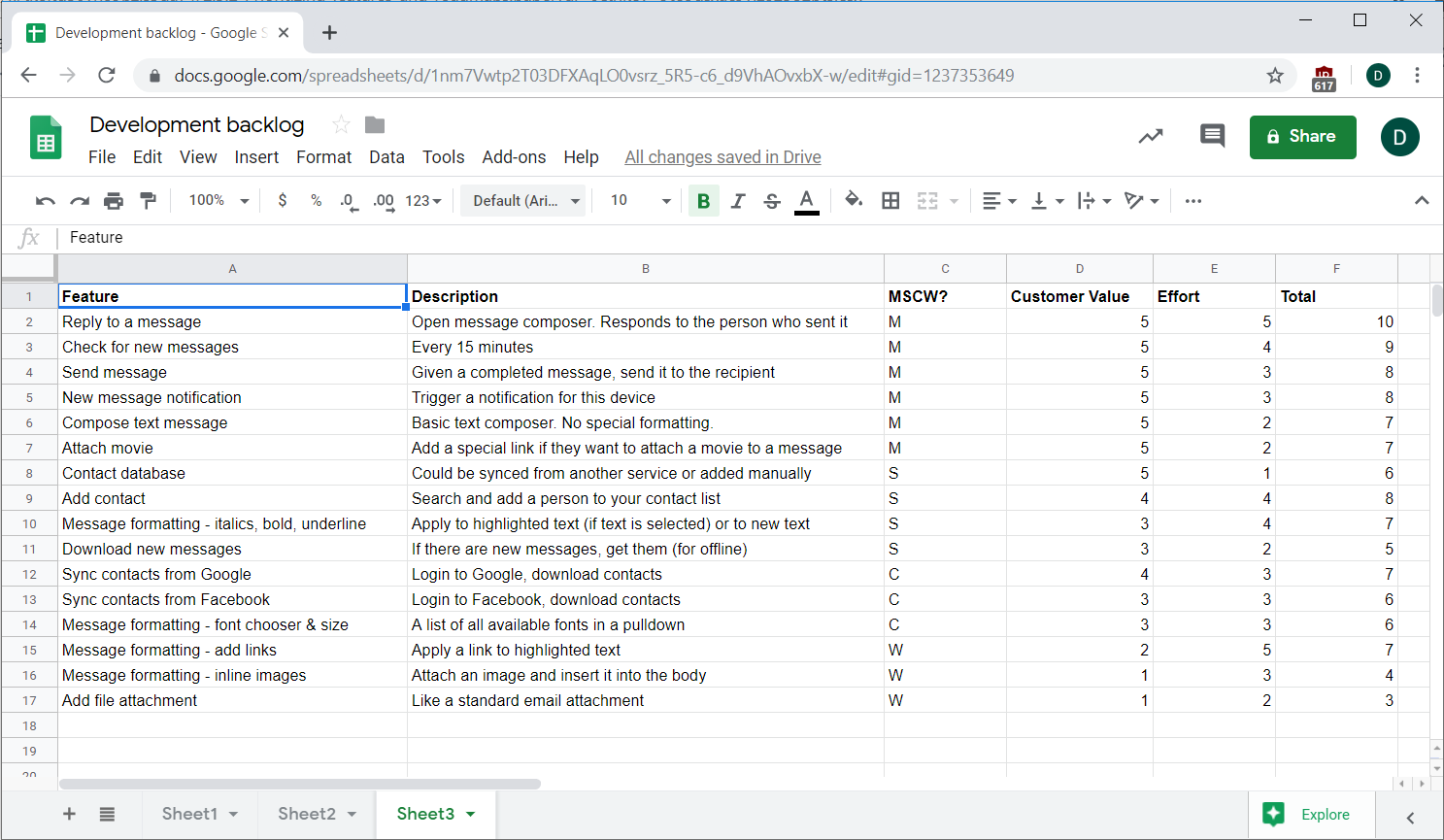
MoSCoW is best used when you have a time-limited project with specific requirements that you must complete. Those requirements determine your M's—and those should be all the M's in your list. This is especially good if you have customer obligations to complete. In that case, you'll want to do just the minimum to fulfill that obligation, then get back to your regularly scheduled roadmap.
RICE prioritization
RICE is another acronym-based method for prioritizing. RICE stands for: reach, impact, confidence, and effort. Some people just do ICE, which is basically the same without the reach. Each of these factors is represented by specific numbers:
- Reach: the number of people who will be affected by or would otherwise use this feature. You can use absolute numbers or a percent of your user base.
- Impact: a multiplier based on how much you believe this will affect those people. Use a value between 0.25x to 4x.
- Confidence: a percent that represents how confident you are about the impact of this feature.
- Effort: the number of person-months it will take to build this from your design and development team.
When you have those numbers, multiply reach, impact, and confidence; those are all factors that increase the success of a feature. Divide the result by effort because the amount of effort involved restricts your ability to ship. When all the factors are taken together, this formula will lead to a ranking score:
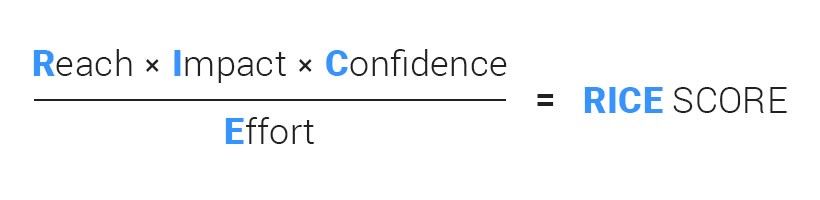
Say you have 1,000 users and are considering a feature that your research indicates will reach half of them in a very positive way. Your reach is 50%, and since the positive impact is expected to be large, you decide to use 3 as the impact multiplier.
You're very confident that the feature will achieve the desired result and decide to represent your confidence level as 80%. You estimate that developing the feature would take two person-months, which are equal to one developer working on it for two months, two developers working on it for a month, or a team of eight developers working on it for a week. Your numbers add up like this:
Reach Impact Confidence / Effort = Score 50% 3 80% / 2 = 0.6
The RICE score for that feature is 0.6. If you do the same process for all of your features, you can quickly sort the list to get your prioritization.
Here's the same list of features as above prioritized by RICE:
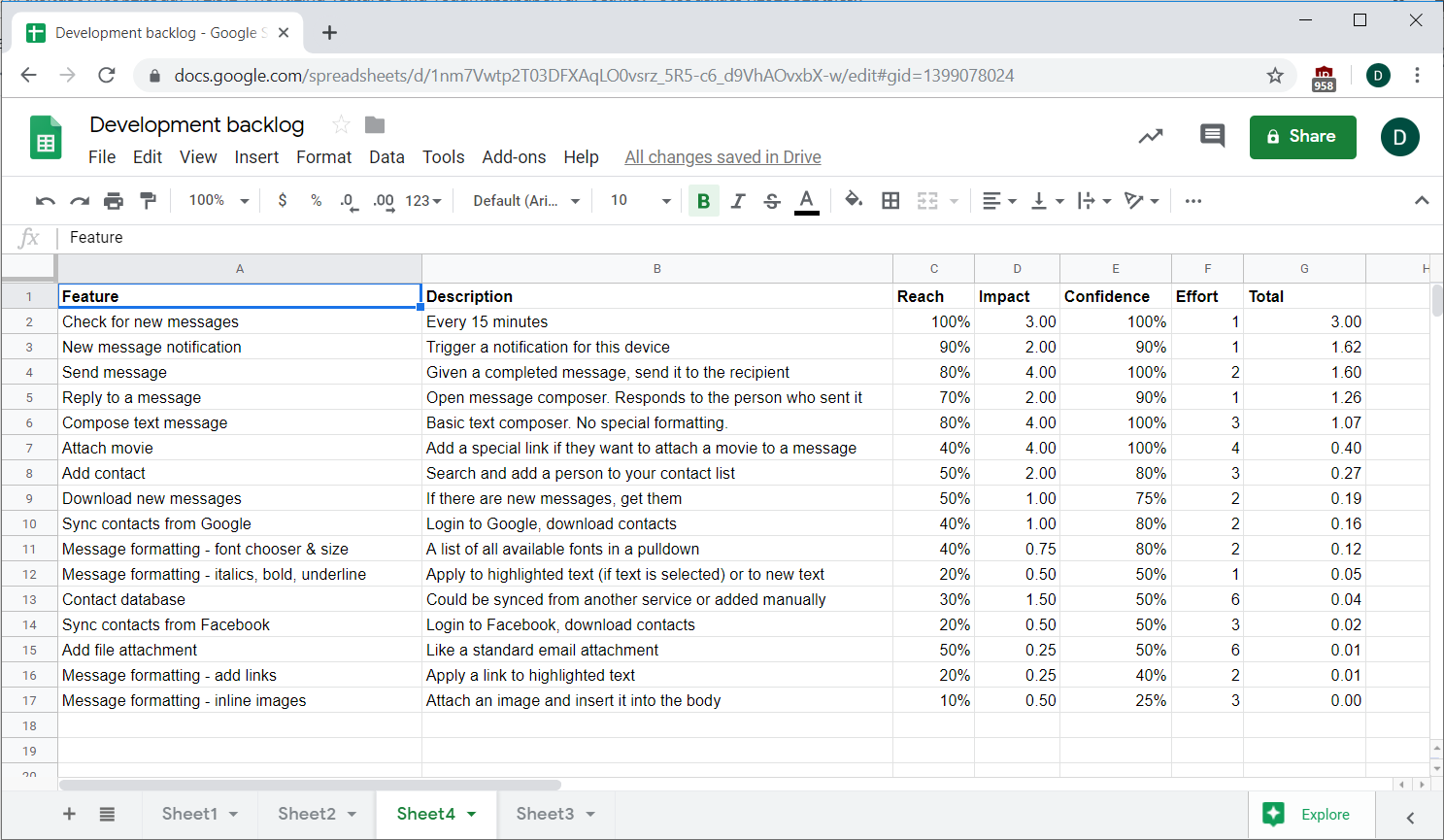
If you're worried about the accuracy of those RICE numbers, that's okay. First, your errors will probably be distributed evenly across all your features, so don't sweat it if any individual one is off. Second, you can use some of the discovery techniques you learned about in previous checkpoints, like surveys and interviews, to help you improve your estimates. Third, you should work with other stakeholders around the company to help you improve the numbers, and especially consult your developers and designers to get the effort estimate right.
Handling roadmap interruptions
As you may start realizing, handling interruptions is a big part of being a PM. It's worth pausing a moment here to discuss this further. One of the biggest dangers of getting interrupted is that you could be giving up on your long-term strategy for short-term wins. Most of the interruptions you'll face will be obligatory features, like customer commitments or CEO requests. These come at a cost—namely, all the other work you could be doing.
As a PM, you have an obligation to do what's best for the company, and often that means giving up on your personal goals to help the company's goals. On the other hand, when you give in to interruptions, you're implying that it's acceptable to interrupt the roadmap and your team's goals. If your priorities are well-thought-out, it may be worth defending them.
So if you're faced with a situation where your roadmap is about to be hijacked for a high-priority item, you can try a few of these tactics to minimize the blow:
- Say no. Often this isn't an option, but it's worth trying to see if you can stick to your original plan.
- Stall a few days. What seems urgent today often is not tomorrow. If you can pause a bit and then regroup, often that critical urgent thing is not urgent anymore.
- Weigh it against other priorities. Make sure you're clear with your stakeholders about the trade-offs you have to make between sticking to your roadmap and handling the interruption. Interruptions have big costs; make those transparent.
- Set the terms of agreement. You may be obligated to ship a feature, but often you can negotiate the details of that feature, the deadline for completing it, or other factors.
- Turn it into a win for everyone. If you're considering something similar for everybody, but it's further out on your roadmap, see if you can do that instead of the specific obligation.
- Say yes. Most times, it's easier to just agree and get it done as fast as possible so that people you collaborate with see you in a favorable way.
- Don't take it personally. It's a feature, not your life. Even if you don't want to do it, always remember that you're doing this because you have to.
In the end, there will come a time where you'll need to put aside your priorities and do what you are asked no matter what. Put it into the roadmap like any other feature, get it done, and move on.
Activity 🎯
Return to your list of features for the Indeed app from the last assignment. Create a spreadsheet and prioritize them twice: once using the MoSCoW method and once using the RICE method. Do your best to come up with reasonable estimates for the RICE values, and note the kind of questions and actions you would take to get to those numbers if you were doing this on the job. After filling in the scores for each feature, sort them in priority order. (You may want to do this with one tab for MoSCoW and another for RICE.)
When you're done, write short answers to the following questions:
- Which method did you like better? Why?
- What was the hardest part of prioritizing the items?
- Compare the results of your sorting according to the two methods. How do they differ? Why do you think that is?
- After you sorted the items, were there any features that surprised you with where they ended up being ranked? Which ones and why?