13.3 Agile Tools
Over the past two decades, agile has become the go-to methodology for software development. In response to this shift, project management tools have adapted to support agile practices. Tools specially designed for Scrum and Kanban implementations have also become available, and new tools are always emerging.
In this checkpoint, you'll examine a few of the most popular agile tools. You don't need to be an expert, but you should have a working knowledge of these tools and feel comfortable speaking about them with your colleagues. Download and check out the trial versions of the tools reviewed in this checkpoint, or better yet—look for opportunities to work with agile methodologies and tools in your current role or side projects. Having experience with—and opinions about—agile tools will help you demonstrate your professionalism and knowledge about product development in your upcoming job interviews.
By the end of this checkpoint, you should be able to do the following:
- Knowingly discuss a few popular agile development tools

Benefits of agile tools
When agile methods were initially introduced, teams were usually colocated. Agile practices were tested out using whiteboards and lots of Post-it notes. As teams became more distributed and team members worked asynchronously, this colocated sense of collaboration had to be translated into an online format.
Digital tools soon appeared; these tools allow dispersed or colocated teams to focus on the tasks at hand and maintain a single, active space to share the most up-to-date information. Tools specifically designed to support agile methodologies increase efficiency by doing the following:
- Enable a convenient way of defining work
- Make it easy to record and communicate information about the work
- Provide real-time status updates that the whole team can access
These tools also lend themselves to one of the keys to agile development: breaking down large, complex tasks into manageable steps. Look out for these benefits as you gain familiarity with a few of the most popular tools companies are using, below.
Trello
Trello is a popular productivity tool. It functions as an online collection of lists, where tasks and notes are tracked on the digital equivalent of a Post-it note. Trello has a fairly straightforward structure, and it's used across industries for everything from personal task management to organization-wide planning. It provides a convenient view of who's doing what and what needs to be done in a single online location.
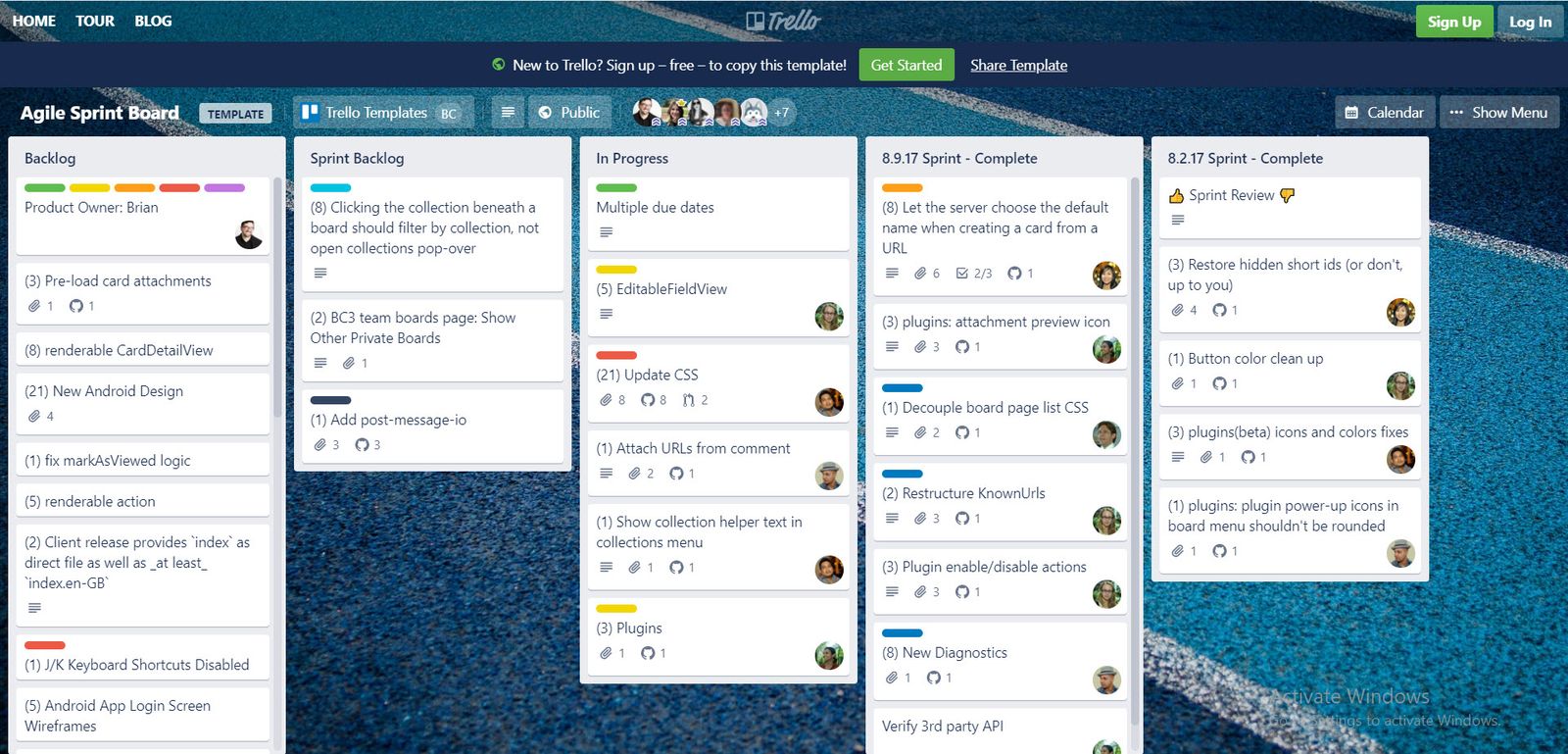
Trello's basic structure includes boards with lists that are a collection of cards. Cards are Trello's container for tasks or ideas. Cards are assigned to team members with due dates, and comments can be added to the cards as needed. Cards can be updated, moved between lists, and reordered within a list if priorities change. Other documents and links can be attached to cards, too.
You will recall from a previous checkpoint the Kanban approach of creating three lists of tasks: not yet started, in progress, and completed. Do you see how Trello mirrors that system? Trello's structure of lists and cards provides a fantastic framework for using agile practices—and specifically Kanban—in a virtual environment.
Trello offers a large library of power-ups, which are specialized plug-in and add-on tools. Trello's clients can use power-ups to connect calendars, assign story points to cards, track timelines, and create parent-and-child relationships between cards (like for epics and stories). Clients can also integrate Trello with popular tools like Slack, Evernote, and Google Drive. More sophisticated integrations are also available, allowing Trello to sync with enterprise platforms like Jira, GitHub, IBM Connect, and Salesforce.
Trello wasn't specifically designed to support Scrum or Kanban practices. However, many organizations have used Trello to build their own agile frameworks and business processes.
To further explore Trello, visit their website and sign up for a free trial version. You will need this trial version later on to complete this checkpoint's assignment.
Pivotal Tracker
Pivotal Tracker (PT) was developed by an agile development consulting firm; it was specifically designed to facilitate lean business practices and agile methodologies. While Trello is ideal for Kanban workflows, PT is considered a great fit for teams using Scrum. In PT, tasks are recorded as user stories. The tracker has a backlog and breaks down prioritized user stories into iterations (sprints) based on assigned story points. Lower-prioritized stories and stories under development wait in an icebox list—the place all items go until they're ready to be prioritized.
PT user stories can be classified as features, bugs, chores, and releases. While working on a story, all team members can view a profile of the user story and all of its included subtasks, documents, comments, status updates, etc. This allows product owners to begin drafting epics or user stories. They can review them with the development team and refine the stories until they're ready to be prioritized and assigned story points.
PT is built with an emphasis on constant feedback. If the product owner is happy with the implementation of a submitted user story, they can approve it, and it moves into the workflow for release. If they find an issue, the user story can be sent back to the developer with notes.
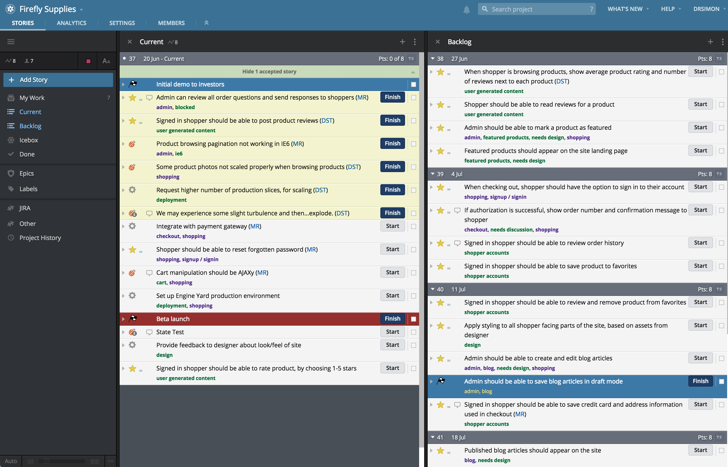
A summary dashboard shows what the team is working on, the status of the stories, and the items that are next on the list. From the dashboard, users can investigate any issues or stories for more information. Since it's designed for agile and Scrum, PT has built-in analytics that capture the team's work velocity compared to its forecasts, display how many story points the team completes each week, and show the cycle time for stories (how long it takes to complete them). It also includes information on whether submissions were rejected or accepted, as well as how long a story stayed in each status, which helps identify where any bottlenecks may exist.
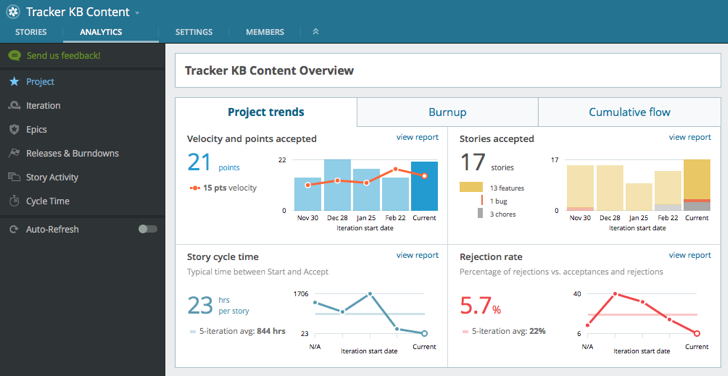
PT is a significantly more robust tool when compared to a task management tool like Trello. While Trello can be customized and enhanced with integrations, PT is designed for its platform to support Scrum implementation from initial ideation to release workflow. PT offers some integrations, but they are limited to issue tracking and code submission tools that partner teams (such as customer support or release management) are likely to use.
To further explore Pivotal Tracker, visit their website and sign up for a free trial version. You will need this later on to complete this checkpoint's assignment.
Asana
Asana is a highly flexible tool that is focused on collaboration. The platform itself is not a fully featured project management tool, but it supports a wide array of integrations and can be customized to suit an organization's approach to agile. Where Trello's cards present an online version of Post-it notes, Asana is more task-oriented and allows for more configurations to track workflow. Asana also supports timeline planning and dependencies between tasks.
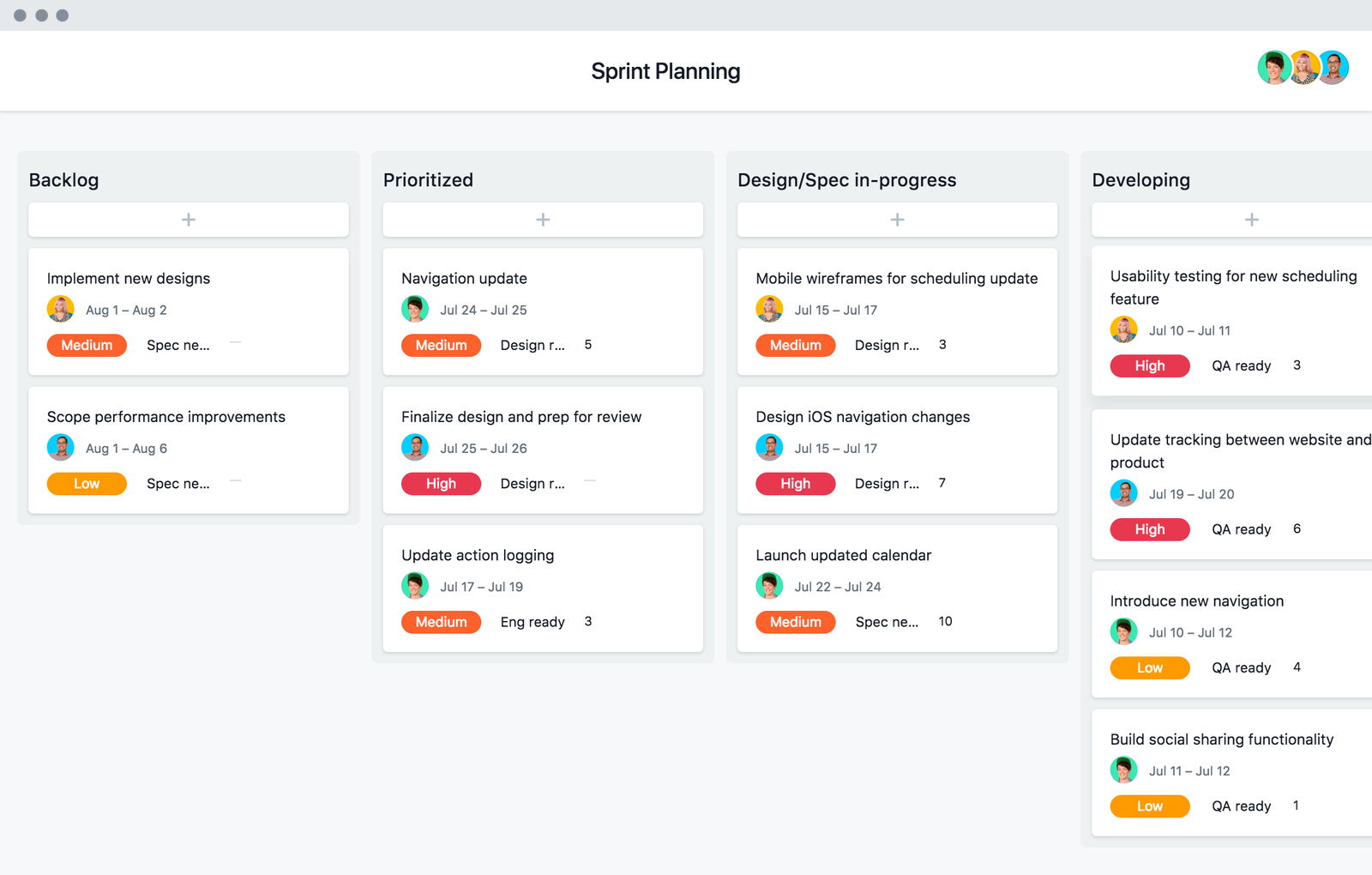
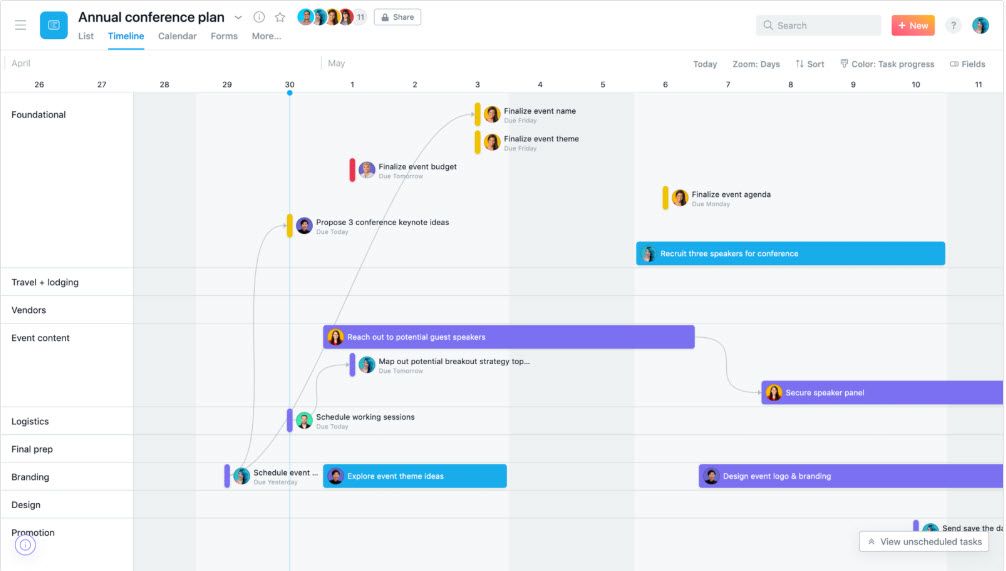
Projects in Asana can be viewed in multiple ways. Viewing them as a board, as seen above, may seem familiar—it is similar to Trello's use of columns and cards. The "Timeline" view depicted below, however, tracks tasks on a day-by-day timeline, showing dependencies:
And those are just two of the options. Log on to Asana for a free trial to explore further.
Jira
Jira is different from the other tools reviewed—it is part of a suite of discrete yet complementary resources. Originally a bug-tracking tool, Jira has expanded to handle the entire scope of software project planning, from conception to release.
The company that created it, Atlassian, also acquired Trello in 2017. Among Atlassian's offerings, Trello is positioned as a project collaboration tool, and Jira, on the other hand, is positioned for agile planning and issue tracking.
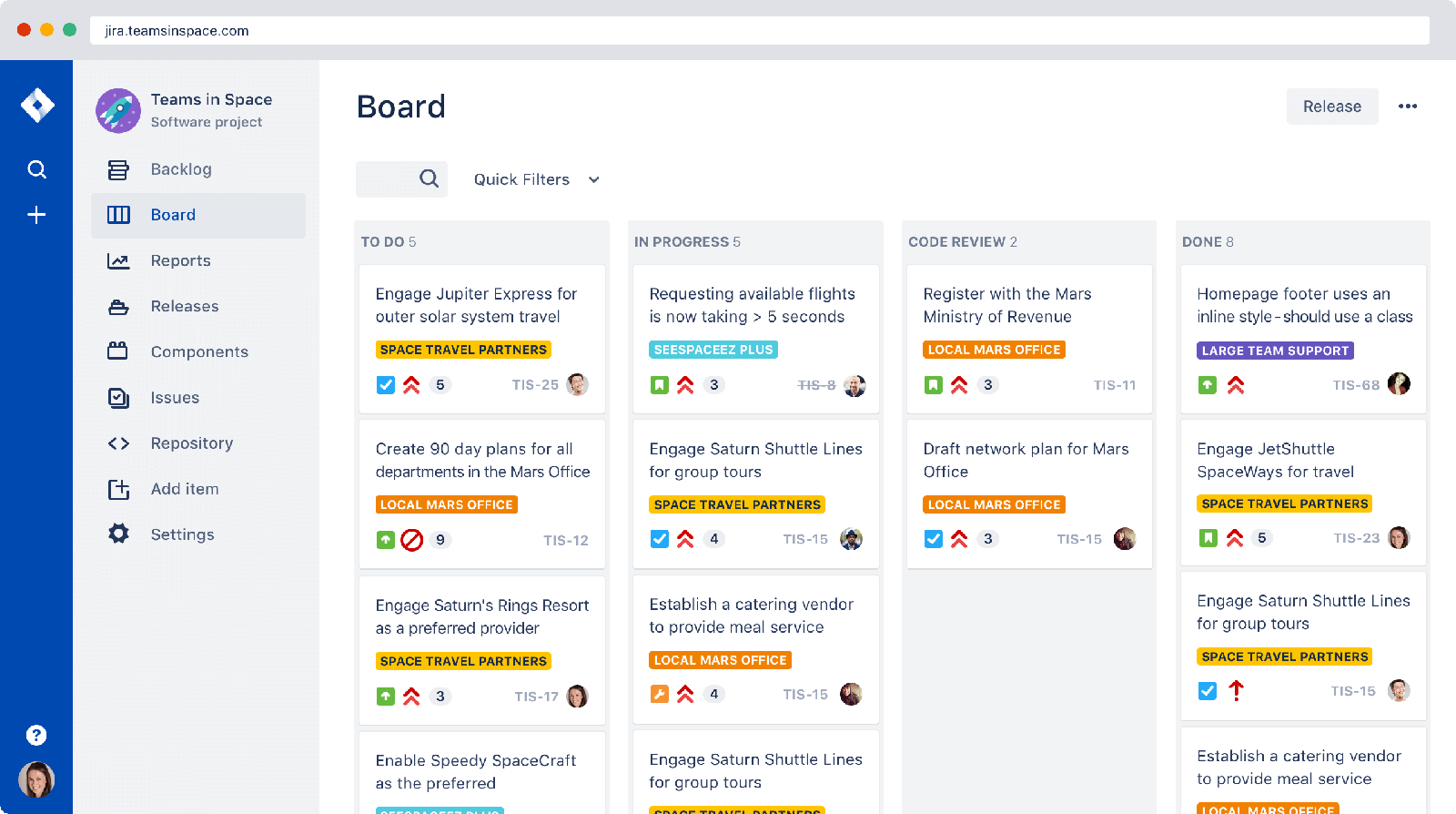
In keeping with its bug-tracking origins, Jira refers to tasks as issues. An epic can be an issue, and it can have sub-issues that are either user stories or bugs. Jira has the same core functions of the other tools: issues can be assigned, have statuses, contain comments, provide story points, and include links to mockups or other documents.
But Jira is also different in that it can create customized workflows. It allows teams to model their own workflow diagrams and identify the statuses that can be assigned to an issue.
Jira is useful on its own, but it's especially powerful when used in conjunction with other Atlassian tools, such as Bitbucket (for Git code management), Bamboo (integration and release management), or Jira Service Desk (IT and customer support). Many large organizations use this collection of integrated tools, making Jira a favorite of large enterprises.
You can test-drive Jira with a one-week free trial found here. You may also want to check out Atlassian's "Agile Coach," which provides many useful articles and tutorials about agile-related topics.
Microsoft Project
Microsoft's project management tool, Project, was originally released in 1984. It was the first widely adopted software for project planning and resource management. At the time, it helped teams identify overloads in project work and dependencies between tasks. It transformed how organizations managed large-scale development projects.
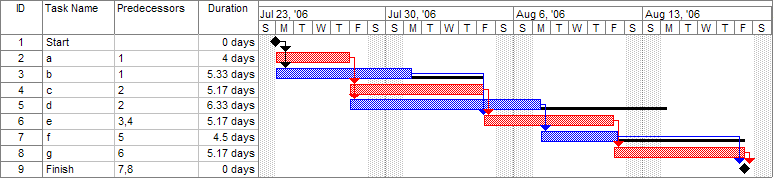
Despite efforts to incorporate agile concepts and keep up with the times, Project is now largely associated with the waterfall approach to software development. Gantt charts, such as the one depicted below, are very representative of Project. These charts show tasks or resources as horizontal bars along a timeline. They are highly associated with waterfall methods but can also offer valuable insights when managing a project. As products and implementations that you work on become more complex, you are likely to encounter Gantt charts.
These are just a few of the tools you may come across in job descriptions, in interviews, and on the job. While you can't master them all, it's helpful to be familiar with at least a few. Think about how you may use these tools as a product manager to record and communicate your ideas. Examine each tool critically—what does each do well? What would you want added?
Practice ✍️
Sign up for the free versions of Trello and Pivotal Tracker (if you are already familiar with one of these tools or have exhausted their free trials, please substitute with another tool).
Add the stories you wrote in the last checkpoint to each of these tools. Then do the following:
- In Trello, set up appropriate columns for your project board.
- In Pivotal Tracker, experiment with creating the user stories within epics.
- If there's any info missing (such as story points), fill in made-up data.
Go through the process of prioritizing and completing some of the stories. Write a short paragraph documenting your experience and comparing the two tools by answering the following questions in your Notion page / notebook:
- How does each tool track task completion?
- What reporting methods does each tool offer to help you see how a story is progressing?
- Which tool do you prefer? Why?