13.5 Daily Sprint 🎯
This section includes an Activity 🎯
As a product manager, you'll be guiding how your team collaborates on a daily basis. How you do this will set the tone for your team's culture and—if done well—earn you the respect of your team members. You'll need to run stand-up meetings, deal with roadblocks and interruptions, and consistently and clearly communicate product objectives, all while managing your time so you can complete your other product management responsibilities.
In this checkpoint, you'll learn about the day-to-day tasks product managers engage in to support the developers during sprint work. You'll explore what you'll be expected to do and learn about strategies you can use to set up your team—and yourself—for success.
By the end of this checkpoint, you should be able to do the following:
- Explain a product manager's sprint-related, daily responsibilities

Stand-up meetings
In agile organizations, most workdays will begin with a stand-up meeting. In organizations using Scrum, this is known as the daily Scrum. You should already be familiar with this concept from a previous checkpoint, but you'll now go deeper into what these meetings entail.
During this daily ritual, everyone on your team updates the group about their work. This is done by addressing three items: what you did yesterday, what you'll do today, and any issues or blockers you encountered. The standard structure and daily updates enable these meetings to be brief and to-the-point.
These meetings reveal important information and updates that affect everyone's work. For this reason, it's essential that product managers actively participate in them. By engaging fully and listening carefully, product managers set the tone for the stand-up and encourage other team members to give their colleagues their undivided attention. When everyone on the team sees daily stand-ups as helpful and valuable, the team is more productive. On the other hand, a team that just goes through the motions and doesn't invest in the stand-up probably won't collaborate well.
The video below by Mike Clayton provides an overview of some of the elements that make up a good stand-up meeting.
Who is involved in a stand-up?
Stand-up meeting participants usually include the team members from product, UX, and development. If you're at a small startup, your stand-up might include all the PMs, UX designers, and developers in the company. However, if you work at a large company, your stand-up meetings will likely include just the developers and UX team members working on your specific part of the product. Ideally, it will be a relatively small number of participants.
Once a team gets larger than about 8 or 10 people, communication and dependencies become more complicated. If the stand-up is attended by lots of people working on unrelated tasks, participants will tune out, and it'll be a waste of their time. If the group that needs to be included becomes too large, split the team up based on responsibilities or areas of the product. Each smaller group can work more efficiently and independently.
Although it's important to keep stand-ups small and focused, occasionally, people from outside the immediate team—who are responsible for a task related to the team's work—will participate. For example, imagine a copywriter from the marketing team is writing the launch announcement for a new feature. They may join the product team's stand-up to make sure their marketing materials are accurate and align with the feature release schedule. Or maybe a member of the infrastructure team needs to participate regularly while implementing backend updates for the feature your team is developing. These colleagues only join daily stand-ups to make sure their work is in sync with the team's work. They will stop attending when there is no longer a need for daily updates.
Where do stand-ups take place?
If your team is colocated (such as you all work in the same office), pick a place that's relatively quiet for your stand-up meeting. Many teams huddle around a desk of one of the team members or in a common area in the office. Stand-ups can be held in conference rooms, but in most organizations, this is avoided in order to reinforce the quick "don't even sit down" nature of the stand-up meeting.
If you have a remote team or remote members, a video conferencing system like Zoom or Google Hangouts will be used for stand-up meetings. Make sure that the environment is quiet enough that remote participants can hear clearly. Using headphones for optimal audio clarity is also helpful. Remember, you want everyone to be paying attention, so be aware of technical limitations (such as poor audio) that might distract team members.
It is helpful to have a screen or projector displaying your team's sprint backlog during the meeting. That way, everyone can view a visual representation of the stories in progress and the specific tasks being discussed. Following each stand-up, the sprint board should be updated to accurately reflect the status of user stories.
When do stand-ups take place?
Most teams have their stand-up meeting first thing in the morning. This identifies any problems or roadblocks to the work and allows the team to address issues promptly. Holding the stand-up first thing in the morning also gives everyone more uninterrupted, focused work time; once it's done, developers can go about their day of coding with no interruptions. This allows developers to get into a flow—a desirable, high-productivity, focused work state.
In today's distributed workforce, team members may be located in multiple time zones. There are a few ways to handle this challenge. One option is to have a stand-up everyone attends at the least disruptive time, such as noon in NYC (just before lunch) and 9 AM in San Francisco. For bigger time zone gaps, part of the team may be participating during their evening while, for others, it will be the next morning. Another option is for teams to have smaller stand-up meetings in the morning for only their time zones. Stand-up status updates should then be shared on a group chat (such as a Slack channel). This approach aims to provide the value of a stand-up, even if the team can't do it together. If your team can't do stand-ups together, you will need to pay special attention to communication to ensure that team members have opportunities to identify and share issues early.
What happens in a stand-up?
Stand-up meetings should focus on quick updates; meetings should last no longer than 15 minutes. That means each team member's update should typically be only one-minute long. If a team member speaks for longer than a minute or two, it's okay to help them wrap up their updates. And if team members drift into deeper conversations and debates, it's the product manager's (or Scrum master's) responsibility to get the meeting back on track. Any issues requiring further discussion should be dealt with after the stand-up, not during it. Identify an issue owner and redirect the conversation to be addressed "offline" or in a separate meeting.
During the stand-up, each team member addresses three questions. Below are the questions along with guidelines on how to answer them and what the team should be focused on.
What did I do yesterday?
Summarize the most important items done yesterday. A product manager might not update the team on everything. Focus on what's relevant to the audience. An update might include the following:
- Meetings and results relevant to the team's work
- Progress made on upcoming or in-progress stories
- Interruptions that prevented you from completing your plan yesterday
When listening to your teammates answering this question, you would consider these questions:
- Did the update match their plans from yesterday?
- Were they interrupted in their work? Has the interruption ended, or is it ongoing?
- Are there any risks that may put a story or sprint goal in jeopardy?
What's my plan for today?
Briefly explain what work you intend to complete today. Things may not go according to plan, but everyone should have a clear picture of what they realistically expect to accomplish that day. This would include the following:
- Items to be finished or make progress on
- Meetings or activities that will occupy your day (also helpful for the team to know if you will not be available)
- Any help needed to complete your work
When listening to your team members' updates, pay attention to these items. If needed, let teammates know that you have input to provide and/or questions to discuss after stand-up is over.
- Are they working on tasks related to your team's top priorities? If not, why not?
- Have they been doing the same task for several days? If so, do they need help? Should you redefine the scope of the task so it can be completed faster?
- Do they have all the information needed to keep moving forward?
Are there any issues or blockers?
This is the most important question of the stand-up. The primary objective of the stand-up is to keep the team working at maximum efficiency. Team members should report on obstacles to doing so (blockers), including the following:
- People or information you're waiting on in order to complete a task
- Tasks you're having difficulty with or that are taking longer than expected
- Tasks where you are not sure how to proceed
- Upcoming deadlines that are at risk of being missed
When your teammates are reporting this information, pay special attention to the following:
- Problems that they're stuck on that are preventing progress
- Anything that you specifically can to do to unblock them
- Any risks that could put stories or a sprint in jeopardy
It's important to note that many team members fail to identify the true blockers to their work. For instance, a developer may be taking longer than estimated on a specific story. During stand-up, the developer doesn't identify any specific issues. But it may be the case that they are working on unfamiliar code. In this situation, you will need to identify that the developer needs help in order to return to their usual level of productivity, even if they were unaware of this need or were reluctant to ask for help. Similarly, a UX designer may be taking a long time creating a wireframe for an upcoming story. The designer may not realize the problem is that the user story is not specific enough, leaving too much room for ambiguity. It's the product manager's job to identify that there's an issue and spend time with the designer to figure out what's really blocking the work and clarify the story that is causing confusion.
Be on the lookout for blockers to your team's progress. Take the time to dig into each issue, identify what is really causing the block, and determine how you can help. Do this after the stand-up meeting is over. The whole team doesn't need to be impacted; as you discuss issues with the relevant team members, others can return to work.
Tips for running a great stand-up
There are several strategies you can employ to run efficient, effective stand-up meetings.
- Remind everyone to provide substantive, meaningful, and relevant answers to the questions. Updates should be significant and meaningful to the team. Team members shouldn't avoid sharing or provide only a bare-bones update. Give team members feedback about whether or not their updates are useful.
- Keep the meeting moving at a healthy pace. Discourage team members from engaging in off-topic conversations or providing long-winded updates. If a discussion is needed to address important issues identified during stand-up, do this immediately after the stand-up meeting is over. Don't let the issue overtake the stand-up.
- Highlight any updates that have a significant impact, such as a missed deadline or an issue with ramifications outside of the team. Take action on these items right away by sharing them with the appropriate stakeholders. Make sure someone takes ownership of each issue and is responsible for addressing it. Issues without owners tend to slip through the cracks.
Burndown charts
One of the goals of daily updates is to help you check on your team's overall progress on the sprint. But how will you know if the team is on track to complete all the work they committed to? Burndown charts are a useful tool to help track progress during a sprint.
A burndown chart is typically made accessible to other teams in your organization for transparency. On the chart, the horizontal axis shows each day of the sprint, and the vertical axis measures the work remaining in points.
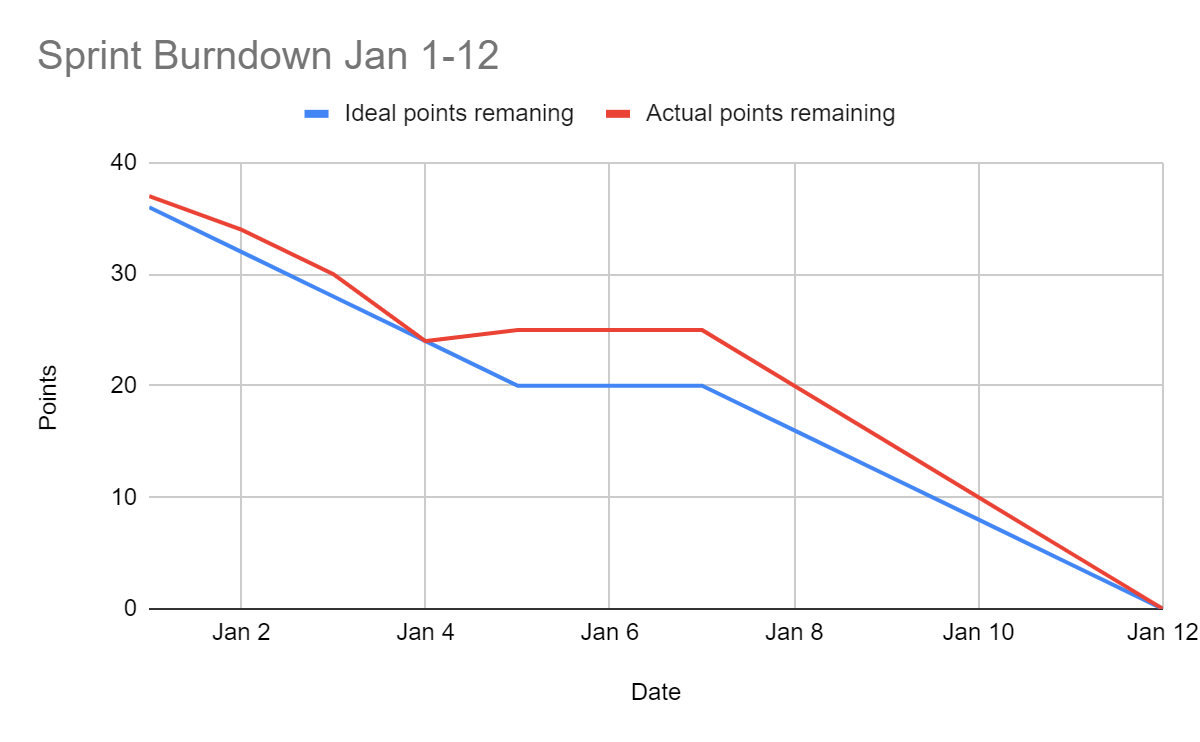
In the sample chart above, there are four developers in the sprint, and the team is expecting to complete 40 points—about 1 point per developer per day in a two-week sprint. There are two main lines on the chart—one is for the ideal points remaining at that point in the sprint; the other line represents the actual amount of points remaining in the sprint—in this case, 40 points minus the number of points that the developers completed. The flat part in the middle (around January 6th) represents the weekend, when no work gets done.
Note that the actual line (representing the work remaining) can go back up. This happens if new work gets added to the sprint or if a story is accepted and then rejected later. As long as the two lines are close, your team is on a good pace to get all their sprint work completed on time. If the lines diverge, it means that your team will finish early (and needs more stories to work on) or won't finish completely (and needs to remove items from the sprint). The Scrum master is responsible for keeping this chart updated. Many project management tools can create these charts automatically.
Handling roadblocks
As a product manager, it's your job to address and help resolve issues blocking your team, even if you can't be the one to resolve all of them yourself. Roadblocks are inevitable. At some point in your career, your team will get stuck on a problem and be unsure about what to do next. In all likelihood, this will happen often. Serious roadblocks can even cause delays that will impact your company's larger plans.
When such a roadblock occurs, the following strategies may help to overcome it.
- Bring together the appropriate group of people to determine how best to unblock the situation. That usually means you (the PM), the person who is stuck, that person's manager, and anyone else on the team who can meaningfully contribute to a decision. Keep the group as small as possible to accelerate decision-making.
- Assign an owner to the situation. The issue owner is the person responsible for planning and executing on the method you decided on to get unblocked. Give this person the authority to do what's needed to overcome the roadblock. You will also need to give the person you assign as owner the resources to resolve the roadblock; often, this means help from other team members and time to figure out a solution.
- Set a timeframe or deadline to resolve the issue. If the deadline passes without a solution, reconvene a group of people to make another decision on what to do next. You may want to escalate this up your chain of management. Managers should be informed of the situation and made aware if their involvement is necessary.
- Check in frequently to be sure that progress is being made on resolving the roadblock. The goal is to ensure that there are no further delays or problems in getting the issue resolved. Make sure the team knows you are not trying to micromanage the situation; let them know you trust them and focus on asking what you can do to help.
- Communicate the issue to the right stakeholders. In most business environments, bad news given with notice and a plan is okay; surprises are not. Make sure that everyone on the team and the appropriate management team members understand what's happening. Communicate the exact status of the issue and your plan to resolve it. This will give managers reassurance that you have the situation under control.
If you've followed the steps above, you're well on your way to overcoming any roadblock.
Daily product work
In addition to facilitating stand-up meetings and resolving roadblocks, product managers have a variety of daily tasks to complete. These regular duties are important—they move product development along and keep stakeholders positively engaged. It's a good practice to schedule time on your calendar to ensure that you take care of these tasks. Many PMs find it helpful to do them right before or after a stand-up meeting; this establishes a routine of tending to the housekeeping before you get into the core of your day.
Communicate progress
Communicating effectively with stakeholders is a key responsibility of any product manager. You should always know the status of product work underway and keep stakeholders informed of the progress. Not everyone needs to know everything, but you should regularly be thinking, "Who needs to know about this update?"
Maintaining an updated sprint board (or whatever project management tool your team uses) is the best way to track the state of your product's development. Pay close attention to the developers during stand-ups and follow up to clarify any questions about the team's progress.
When you first join an organization or team, always ask which stakeholders need which updates. As you establish relationships and become more familiar with the organization, you'll learn who needs to know what information and learn to anticipate which teams will be impacted by certain issues, new developments, or delays that arise in your team's work.
For example, the marketing and sales teams need to know as soon as possible if it seems likely that there will be a launch date delay for a new feature. These teams are scheduling their work and making commitments based on the target dates you provided. Successful product managers do everything in their power to reduce surprises for internal partners. You might also need to share updates with other product teams. For instance, if another team is working on a feature that was designed to be released after your launch, their product is likely to have dependencies on your team's work, and they will need to be updated about any changes to your team's launch timeline.
Given all the interwoven work happening across departments and teams, it's a good practice to share a summarized version of your team's stand-up updates on a shared Slack channel or project management resource. This doesn't replace your direct outreach to specific stakeholders, but it allows interested parties to check in for updates as needed.
Move user stories along
In many ways, a product manager is a coach. And like any good coach, a good PM focuses on supporting their team, creating opportunities for success, and ensuring each team member has what they need to do their best. PMs serve their development and design teams in specific ways; responsibilities vary from team to team, but they always include several key tasks:
- Validating features in development or staging to ensure that the work accomplishes the user story objectives
- Reviewing user experience research, interface designs, technical specifications, and test plans
- Answering questions or addressing issues, especially about user stories
You should always endeavor to handle these tasks promptly. Your team may be stuck waiting because they need your answer to proceed. A product manager's lack of feedback or engagement with their team will delay completion of user stories.
Check your product KPIs
It's important to keep track of the key metrics and outcomes your company is using to assess your product. You should know where you stand on those metrics and how they're trending. If your company has not defined clear KPIs for your product, this should be one of your first tasks. Establish measurable benchmarks to track how the product is performing and check on those numbers regularly. If a stakeholder asks, you should immediately be able to report the top-level metrics and their general trend, like "conversions are up 20% month over month."
Dashboards and data analytics tools will also help you quickly review metrics and conduct sophisticated analyses. With these tools, you can create comprehensive reports about product performance. And if you see an anomaly, like a big spike or dip in product use, you can use the data to investigate further and determine what caused it.
It's particularly important to monitor the metrics for features or functionality that recently launched or changed. If you launch a new feature and suddenly see a big drop-off in product use, it could indicate a problem with the new feature, like a bug or design flaw. By checking business metrics frequently, you can catch problems early and take action quickly.
Prepare for meetings
Poorly planned and disorganized meetings are a nuisance. But if you take the time to plan and prepare for meetings, they will be more productive (and less irritating) for participants. Always review your schedule and the agendas of upcoming meetings, and ask yourself what needs to be done prior to your upcoming meetings.
Do you need to conduct research, pull data, or have a conversation with a team member? Do you want the meeting to accomplish specific goals or outcomes? If you're the meeting organizer or owner, make sure you've provided participants with a clear agenda and objectives for each agenda item. You can also use meetings as an opportunity to showcase your team's accomplishments and highlight the value of their work.
Do research
As the product manager, you need to be the world's leading expert on your product. This means keeping yourself constantly informed on your users, your competitors, your industry, and your product. Block off time to dig into research on a regular basis. A good set of questions to start with includes the following:
- When did you last speak with one of your users?
- What anecdotal feedback have you received about recent enhancements?
- If you work on a B2B product, when did you last speak with account teams or discuss your product with clients?
- Have you looked at user behavior in your analytics tools? How have users responded to surveys or A/B testing of new features?
- What are users discussing in your product's user forums?
- What is the competition working on?
- What topics are trending in the news about your industry, company, or product?
This research can be more free-form than other daily rituals, but you should still identify a specific goal you want to achieve. For instance, you can work with your sales and account teams to organize four client calls to discuss upcoming features, or you can investigate whether certain users adopt new features more quickly than others.
Protect your team's time
As product manager, you'll want to protect your team's time and ensure that they can focus on the most important work. If other people in the company are making demands on your developers' time, it is your job to intervene. Figure out what the person needs and take ownership of addressing it.
You may also need to police yourself to ensure that you don't become the interruption. Avoid inviting engineers to meetings unless absolutely necessary. Collect your inquiries for meeting times rather than sending numerous disruptive emails or messages. Try to book all meetings in a single time block to leave developers lots of uninterrupted work time.
Activity 🎯
This activity has two parts.
- Imagine you work at Spotify, and your team has been working on the following epic:
As a Spotify user, I should be able to upload songs to my account so that they're accessible on all my devices.
Your team is dealing with a series of roadblocks. These include the following:
- Day 1: A developer is unsure about how to handle errors when uploading.
- Day 6: It's taking longer than expected to complete, putting the sprint goal at risk.
- Day 10: A developer tried to build the upload feature, but it's just not possible.
Think through what you would do in each of these situations. How will you approach resolving each roadblock? What else do you need to know? What should you learn from this for the next sprint or project? Write up a few of your ideas.
- Think through any past experiences you've had that involved pushing a big collaborative project forward. If possible, focus on projects that had something to do with technology or that involved a situation in which you needed to rally others to get things done. What problems or unexpected issues came up? Did you run behind the deadline? How did you handle those situations? Write down one or two examples and practice how you might talk about them in a job interview.