7.5 Surveys & NPS
You've probably taken a survey at some point in your life. And you've most certainly been asked to take a survey on a website or by email, but have ignored the request.
For product managers, surveys are an essential tool for digging deeper into what's really happening with your users and your product. In particular, PMs use a certain kind of survey question that later becomes the net promoter score (NPS). You may recall from the business metrics checkpoint you completed earlier in this program that NPS is often one of your key metrics. In this checkpoint, you'll learn more about how to craft surveys, how to get people to respond to them, and how to use NPS to diagnose your product and understand whether or not you're on the right track.
By the end of this checkpoint, you should be able to do the following:
- Explain the importance of NPS in modern product development
- Write good survey questions and run a survey
What is a survey?
A survey is a series of one or more questions used to learn about groups of people. Using the results of a survey, you can draw conclusions about the survey respondents and their preferences, needs, and behaviors. You can also extrapolate trends and observations about potential users who are similar to the people who participated in your survey.
PMs use surveys because they don't have the time to talk with every single user. Instead, surveys can help get answers from a larger number of users at once. As a PM, you can analyze the results of that survey and, with an appropriate amount of caution, make reasonable assumptions about everyone who might have taken it (your target audience).
Preparing your survey
Before you run a survey, you need to make a few decisions that will affect how you build, distribute, and analyze it.
Choose your goals
As always, take some time to decide what you want to learn in the survey. You will need to limit your goals—the more goals you have, the longer your survey will be. And with a longer survey, you'll have fewer people who will fill it out all the way through. Prioritize what you want to learn, then cut it back to the one or two items that you want to dig into the most.
Pick your audience
Like most user research, you need to decide who you want to talk to. Your audience will impact the number of responses you get, how you acquire people to take those surveys, and how you analyze and report on the results.
Determine your sample size
As more people take your survey, you can be more confident that the results will match the audience as a whole. But not everyone you ask to take the survey will complete it. Also, if you plan on surveying the same audience in the future, it helps to vary which people you survey. If you keep surveying the same people over and over, they'll start ignoring your requests. In short, you want to ask just enough people to be confident in your results, but not too many as to exhaust your audience.
Use a tool like this sample size calculator to determine the right number of survey completions you'll need in order to have statistical confidence in your results. Just change the "population size" to the total estimated number of people in your audience. Keep in mind that this tool will give you the number of responses you need. You'll need to invite more people to take the survey than the number the tool gives you because many people will ignore your request.
Random or non-random sample
You can issue your survey in two ways. First, you can randomly select people from your audience to take it. This works well when you have very few criteria for the people you want to participate in it, like "anyone who visits my site" or "any of my enterprise customers." If anyone will do, just pick randomly from people who fit the criteria.
Second, you can do non-random samples if there are specific people you want to learn from. For example, you might want to target your 10 best customers to respond to a survey so you can learn how they're doing compared to everyone else. You might also use this if there are a set of customers who you know are likely to respond—pinpoint target them for your survey.
Incentives
Some people will do a survey for free as long as it's short and relevant to them. And people are much more likely to respond if they're given an appropriate incentive for participation. The incentive could be actual money or gift certificates. Or it could be something relevant to your product, like a discount or access to exclusive features. Many companies run a sort of lottery where they randomly select one survey response to receive a very large gift certificate or a desirable prize, like an iPad. This can be a great motivator ("Answer for a chance to win $500!"). Remember, only give the incentive to people who actually complete your survey.
You should especially consider incentives if you're unlikely to get many responses, as in these cases:
- Your audience is an exclusive group with limited time, like CEOs.
- You have an especially long survey, and you want to ensure people complete it.
- You have a small audience and need assurance that a large percent complete the survey in order for you to be confident in the results.
Promoting your survey
You'll also need to get the word out about your survey. As a best practice, you should be very clear as to why you want this person to take the survey, how long it will take to complete (with an accurate estimate), and what rewards they'll get (if any).
Your choice of where to promote your survey depends on your audience. Here are some popular methods that you can use to encourage participants to take it. Keep in mind that some of these methods could recruit people who are actually not part of your survey audience:
- Through a website widget or app notification (targeting users for your app)
- By email invitation (targeting app users or specific individuals)
- By buying an audience on a service like Google Surveys, especially if you need specific audiences or people who don't use your app
- Through social network posts to get anyone to take it
Writing survey questions
Now that you have a clear idea of your goals and audience, it's time to write the survey questions. Well-written questions are an art. They need to be clear and unambiguous because the people taking the survey won't be able to ask you questions to clarify.
There are many different types of questions—you could ask nearly any question in a survey. Here are a few typical question types that you should be aware of and use frequently.
Open-ended
An open-ended question is a question that has a fill-in-the-blank response. When building an online survey, you will likely have access to survey tools that let you choose the size of the response box where respondents type their answer. Set the size as small as possible for the response that you expect. If you're expecting a few words or a sentence, a one-line answer is plenty. Also, keep in mind that the longer the answer you expect, the less likely people are to answer your question. For that reason, you should limit the number of open-ended questions you ask in a survey.
Numerical
Some open-ended questions are fill-in-the-blank, but only for numbers. For example, you could ask your users, "How much would you expect to pay for [my product]?" and leave an empty box for them to fill in the answer. Make sure it's clear that you expect a number as a response. Some survey tools will do error checking on the responses to ensure that you get a number response in the blank.
Multiple choice
A multiple-choice question asks users to choose one or more pre-written answers to a question. Keep in mind the following two considerations when writing a multiple-choice question.
First, you need to decide if the question should ask for a single choice (only one answer can be selected) or multiple choices ("Select all that apply"). If you ask for a single choice, make sure that each option is unique and mutually exclusive. If you're asking how many email accounts a person has, you don't want your users confused between two options like "between 2-5" and "between 5-10" where the choices overlap.
Second, always consider whether or not the question should have an "other" response. You may not be able to come up with all the various multiple-choice responses that your users may have to a question. You'll also want to keep the number of answers to a reasonable amount (say, no more than seven). If there are other low-occurrence responses or if you're unsure about other potential responses, give your users a chance to provide their own answer. Offer them an "other" option and a blank text field where they can enter their response.
Likert scale
A Likert scale is a multiple choice question where you provide users with a numerical scale to express a sentiment like, “On a scale of 1-5, with 1 being 'strongly disagree' and 5 being 'strongly agree,' how do you feel about the following statements?”
The best practice here is to use a scale of either five or seven options. Too many options will confuse your users, and too few will not provide enough information. Also, an odd number will let users choose a neutral option. These questions are often just stacked one after the other in a big table. One of the benefits of this method is that it's easy and quick for users to answer—as long as the prompts are clear.
Keep in mind that you may need to provide a "not applicable" option in case the question doesn't apply to the respondent. For example, you could ask people, "I enjoy using Instagram" on a Likert scale, but what about people who don't use Instagram? Give them an out by having an extra "N/A" option. Visually representing the scale might also be a good idea because it can make it easier to answer, as you can see in this image:

Question types to avoid
For a PM's purposes, there are a few types of questions that are best avoided.
Sliders
In this question type, a sliding control asks users to set a slider at an appropriate place based on their feelings about something. While this may seem cool and interactive, it's much better to use a Likert scale. Likert scales are easier for people to answer because there is a finite number of answers, while a slider provides infinite options. Slider controls can also be difficult to use, especially on a mobile device.
Sorting
Sorting questions, in which users are asked to organize their responses into categories or rankings, are also difficult in surveys because the controls are difficult and non-intuitive to use. Instead, find another way to ask the question. If you want respondents to sort which products or features they like, dislike, or don't care about, use a series of Likert scale questions to get at their responses. You can later do the work of sorting out their responses into groups. Don’t ask your respondents to do work that you can do for them.
Yes–no
A true–false or yes–no question is generally a bad question to ask. You can always come up with a better version of this question that helps you understand the responses in more detail. If you have a yes–no question in mind, try to convert it into a multiple-choice or Likert scale question instead. Your survey will benefit, and the information you collect will be richer for it.
Other survey considerations
Here are a few other items to keep in mind as you assemble and deliver your survey.
Qualification questions
If you're recruiting your survey participants from your website or social media channels, you may want to ensure that they're really the right people to take your survey. It's a good practice to ask a few questions right at the start to qualify or disqualify respondents. For instance, if you need your survey to be answered by Facebook users, ask whether or not someone uses Facebook as a qualifier. Or better yet, ask how often they use Facebook. Set the survey to reject disqualified respondents from answering any additional questions. Be sure, however, to make your message positive. And if you're offering incentives, it's a good idea to still include those who were willing to answer but didn't fit the bill.
Branching and skipping
Online survey tools will give you options to decide what the next question should be based on the answer to a previous question. For example, if you reach a point in your survey where you want to ask parents a specific set of questions, you could ask a question like, "How many children do you have?" If the answer is one or more, take them to the next question. Otherwise, skip the user ahead a few questions to the part of the survey that is not specific to parents. Branching works similarly: you can create a branch with questions for people who have children and one for people without children. At the end of those individual branches, users will be directed back to the common survey questions for both parties.
Testing
You should always test your survey. You'll often discover that questions and answers that seem easy and obvious to you may be hard to answer or confusing for others. Testing will help you spot and address those issues in advance—before you go through the trouble of recruiting respondents. Much like in any other kind of user testing, if your testers don't understand a question, you should assume the problem is with your wording choices, not with your respondents. Rewrite problematic questions until testing shows that respondents understand what you mean and can answer those questions in a useful way. You'll also want to test how long it takes for people to complete it.
One approach is to test your survey with your coworkers. They're usually savvy enough to spot the issues you're looking for. They'll probably also have ideas for additional questions. Another approach is to test with a subset of the people you are targeting—say, 10% of the sample. Remember that you're testing the questions, not checking the results, so just focus on any confusing questions or unexpected issues with the results. For example, if you find that many people are abandoning the survey after hitting a specific question, you can fix that question and keep the rest of the survey intact.
Ask over time
A good practice in surveys is to ask the same questions over time to see how trends are changing. If you have a well-crafted survey of users' sentiments for your product, keep administering it to new people every month or two. You can then track the changes to determine if you're improving or to identify any unexpected drops. This is especially important in the tracking of NPS, as you'll read about below.
Take all the surveys
A good way to get better at survey creation is to take every survey that you're offered. Even if you don't finish it, you can learn a lot about an organization and its needs by reading the questions they're asking. You'll learn to recognize what makes a quality survey. And you can gather ideas for new types of questions to ask—or learn what not to ask.
NPS surveys
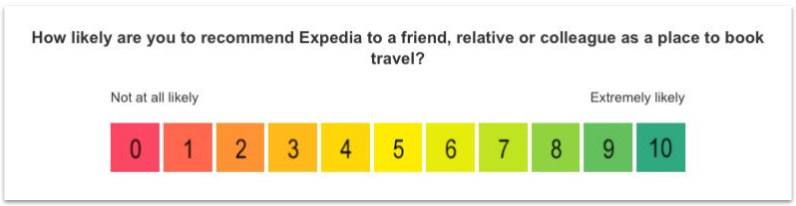
Net promoter score (NPS) is a common business metric used in many products and industries to assess consumer sentiment about a product, service, or company. It comes in two parts. First, it's a survey question to your users that looks like this:
On a scale from 0 (not likely) to 10 (very likely), how likely are you to recommend [your product] to a friend or colleague?
As you may notice, this is actually a Likert scale. The people who answer 9 or 10 are called promoters. They are likely to say good things about your product and promote your services. Those who fall in the 7 and 8 range are considered passive. They usually won't say anything—good or bad—about your product. The ones who answer with a 6 or less are your detractors. They are likely to say bad things about your product, or not encourage others to use it.
Once you have your results, use the following formula on the responses to come up with your final NPS score, which is the second part of this business metric:
percent of promoters − percent of detractors = net promoter score
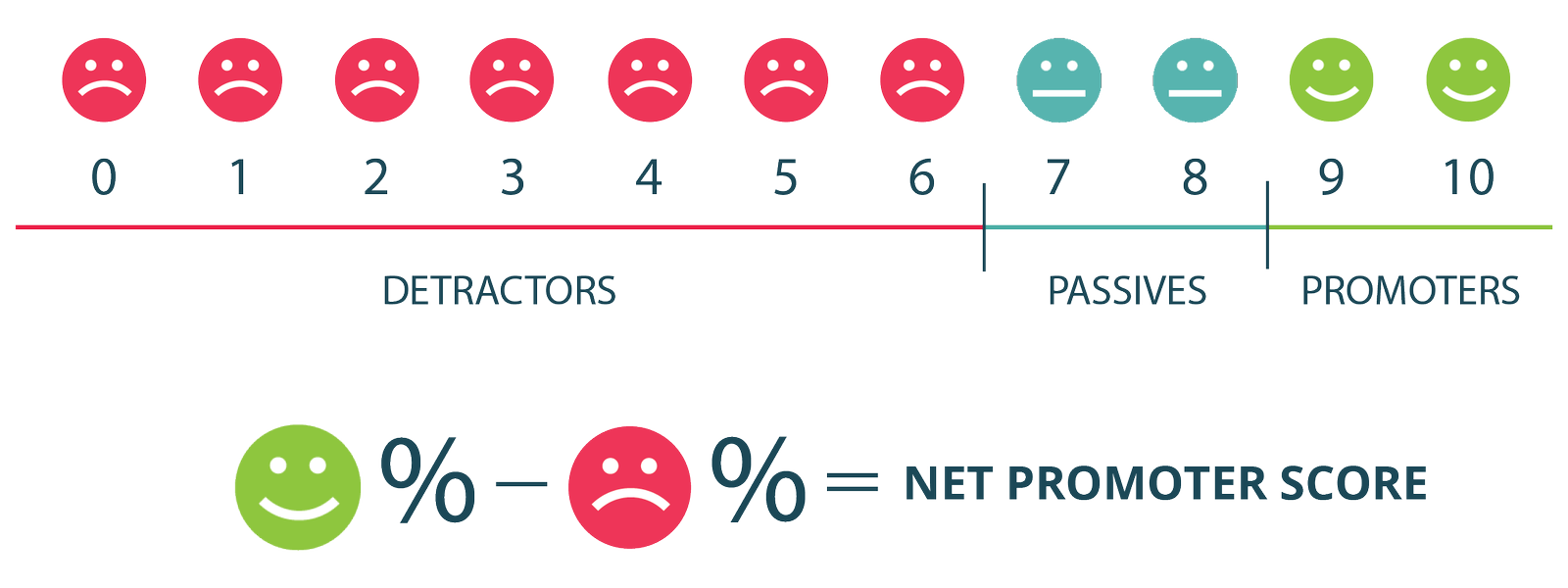
So if 40% of responses were 9's and 10's and 20% were 6 or less, your final NPS would be 20.
The higher your NPS is, the more likely people are to speak favorably of your product or recommend it to others. If your NPS is less than zero, it's a sign that your brand or product is not seen favorably. For reference, here are some NPS scores of popular tech brands, as of November 2019. You can see NPS scores for additional companies here.
| Company | NPS score |
|---|---|
| Apple | 47 |
| Microsoft | 45 |
| 11 | |
| Amazon | 7 |
| -21 |
NPS is not a perfect measure of your product's health. One common criticism of NPS is that it's hypothetical; people aren't actually recommending your product to others. Even with Microsoft's high NPS, how many times have you recommended Microsoft products to others? It's more likely users are professing their sentiment about the brand rather than revealing anything that truly relates to making recommendations.
That said, NPS is a commonly used indication of your overall product health and your product-market fit. For example, Facebook has been dealing with many scandals in recent years, so their negative perception in the public is reflected in their negative NPS score. If you combine your NPS with other metrics of your product's health, the NPS scores usually correlate well and could be indicative of the overall momentum of your company or product.
Collecting NPS data
You can collect NPS data in a larger survey or ask it as a sole question. It's common to ask for NPS in a stand-alone email where your recipients can just click the number in the email and their response is immediately recorded. Many websites collect NPS directly on their website via a widget that pops up automatically under certain conditions.
There are many products that will automatically handle NPS for you, such as Delighted or Pendo. Not only can these tools show pop-ups to collect NPS, but they can also automatically email people for NPS ratings, track NPS changes over time, and even let recipients add comments to explain how and why they chose their scores.
How we use NPS results
NPS data is an important indicator for product teams. You should take immediate action if it's low or trending downward. You can also look at how NPS scores change over time to see how much progress you're making. To do this, you need to collect NPS on a regular basis. It's common to survey people for NPS scores every month or two. Or you could collect them continuously if you're using a website widget.
Similarly, maintaining or improving an NPS rating is an OKR in many organizations. Startups, in particular, closely track NPS data. And venture capitalists frequently ask for NPS data when evaluating startup investments. As mentioned before, a large, positive NPS score bodes well for product-market fit and the future of your startup.
You should also track your NPS on specific segments of your users. For example, eBay can segment their NPS scores by buyers and sellers to see how their experiences vary. You might see that the NPS score of your buyers is higher than that of your sellers. This would indicate that you should focus on your sellers' experience. Segmenting your NPS scores by groups can reveal problems that would not be visible in aggregate.
Practice ✍️
You're a PM on [insert your favorite product here]. Conduct a survey to get a sense of how your users feel about your product. Your survey must include at least 10 questions.
Use a survey tool like Google Forms or Typeform to build it. Submit a link to the survey.
Bonus points: Recruit 5-10 users to take the survey. Analyze the results. If you do this exercise with a product you hope to work on one day in your local area, you may even acquire a great story to tell at a job interview in a few months.