7.7 Additional Research Methods
Interviews, surveys, and card-sorting exercises are just a few of the many methods PMs and their UX teams use to research users in the product discovery process. In this checkpoint, you will learn about additional methods, including heuristic and expert evaluations, eye tracking, observation, and diary studies. These narrower, targeted techniques may be the right choice for your specific situation or product. They may lead you to a specific type of insight you may not have gotten any other way.
If you work with a robust UX team, they may be using any of these methods in their work. While you won't become an expert by the time you complete this checkpoint, you will have gained a basic understanding of these methods, their advantages and drawbacks, and the kinds of results they can provide. This will help you collaborate with your UX team and have deep, meaningful discussions on which method they use and how to get the most out of the research conclusions. It's always a good idea to respect the expertise of the people you collaborate with, but knowing a little about their world can make you a better communicator.
By the end of this checkpoint, you should be able to do the following tasks:
- Describe at least three different user research methods
- Explain when each research method will be most useful and why
- Participate in a heuristic evaluation
Heuristic evaluation
A heuristic evaluation is the result of a group of design experts evaluating a product's interface using a fixed set of criteria that represent best practices in user experience. When several experts do this for the same product, they are usually able to identify most of the major user experience problems. You will run a heuristic evaluation by following these steps:
- Decide on the heuristics that you'll use
- Choose your evaluators—experts in design who also know the product's subject matter
- Direct each evaluator to do their evaluation alone using the selected heuristics
- Share your results and prioritize the problems discovered
This method is helpful when you want a quick and inexpensive way of mapping the high-level usability issues in your product. It usually takes a few hours to complete and only requires a few people. Ideally, you should have at least five evaluators participating. It is a useful, methodical way to ensure that you catch most of the major usability problems on your site. And it can give you and your designers a certain level of confidence that nothing major has been missed and that your user experience is solid.
Nielsen's list of heuristics
Jakob Nielsen is a renowned usability expert who came up with a list of heuristics, or guiding principles, to help inform interactive design decisions. These are good rules of thumb when creating and evaluating designs. If you need a list of heuristics to use for an evaluation, this is a great one to start with. You should also consider adding or removing other heuristics based on your specific needs or domain.
Nielsen's 10 usability heuristics for user interface design are outlined below.
1. Visibility of system status
The system should always keep users informed about what is going on, through appropriate feedback within reasonable time.
2. Match between system and the real world
The system should speak the users' language, with words, phrases, and concepts familiar to the user, rather than with system-oriented terms. Follow real-world conventions; the information should appear in a natural and logical order.
3. User control and freedom
Users often choose system functions by mistake and will need a clearly marked "emergency exit" to leave the unwanted state without having to go through an extended dialogue. The system should use support features that make it easy and convenient for users to undo and redo.
4. Consistency and standards
Users should not have to wonder whether different words, situations, or actions mean the same thing. Follow platform conventions.
5. Error prevention
Even better than good error messages is a careful design that prevents a problem from occurring in the first place. Either eliminate error-prone conditions or check for them and present users with a confirmation option before they commit to the action.
6. Recognition rather than recall
Minimize the user's memory load by making objects, actions, and options visible. The user should not have to remember information from one part of the dialogue to another. Instructions for use of the system should be visible or easily retrievable whenever appropriate.
7. Flexibility and efficiency of use
Accelerators—unseen by the novice user—may often speed up the interaction for the expert user, making it so the system can cater to both inexperienced and experienced users. Allow users to tailor frequent actions.
8. Aesthetic and minimalist design
Dialogues should not contain information that is irrelevant or rarely needed. Every extra unit of information in a dialogue competes with the relevant units of information and diminishes their relative visibility.
9. Help users recognize, diagnose, and recover from errors
Error messages should be expressed in plain language (no codes), precisely indicate the problem, and constructively suggest a solution.
10. Help and documentation
Even though it is better if the system can be used without documentation, it may be necessary to provide help and documentation. Any such information should be easy to search, focused on the user's task, list concrete steps to be carried out, and not be too large.
There are several drawbacks or limitations to using a heuristic evaluation. First, the evaluators need to be both design experts and people who know the product domain—a combination that can sometimes be hard to find (especially if your product is within a very specialized domain). Second, this is no substitute for getting feedback from your real users. The issues your evaluators find may not be the same problems that your users experience. In most cases, you'll be better off spending your time recruiting and getting feedback from users than consulting with experts on a heuristic evaluation. That said, if it is very difficult to get feedback from users. Also, if you are complementing user feedback with expert advice, heuristic evaluations can still be a useful framework for organizing that feedback process.
Expert evaluation
Some products or issues are tailored to specific groups and require deep expertise or training. If you want feedback, you'll need to find someone who knows that domain well. If, for instance, you're working on software for heart surgeons, you'll want to talk to heart surgeons; other people will not be able to give you the feedback you need.
An expert evaluation is simply a conversation or product evaluation with someone that has deep experience in a specific area. This could take the form of a one-off interview or a long-term engagement to provide continuous feedback about your product.
You may only need an expert for a conversation or two, but keep in mind that it could be worthwhile to establish a long-term consultation or hire experts into your teams if you need that kind of specialized knowledge on an ongoing basis. For example, Flatiron Health embeds doctors with their product and tech teams to help those teams create better medical research solutions. Many companies have domain experts as advisers. And if you're creating a new product, it's a good idea to talk with other experts in that field to get insights about your product's domain.
The main drawback of this method is that getting time with experts can be difficult and expensive. For example, if you need expert advice from a doctor, it could cost you hundreds of dollars in consulting fees and prove difficult to schedule their time. For a small fee, many companies recruit experts and offer a service of matching you with the right people, saving you the time and effort of trying to find an expert yourself.
As an alternative to 1-on-1 consultations with experts, you could go to conferences, meetups, and other less formal settings to meet these experts yourself. That also will take your time, money, and other resources to accomplish, but you may be able to get the information—and build long-term ties to relevant people—with fewer resources than other methods may require.
Eye tracking
Eye tracking is a method of learning exactly what people are looking at when using a website or application. It's most commonly used in the publishing industry to understand how users read articles, view advertisements, and navigate websites. You can see an example of what it looks like here.
The result of an eye-tracking study is a breakdown of what people look at on your site and when they look at it. This is usually in one of two forms: a gaze plot or a heat map.
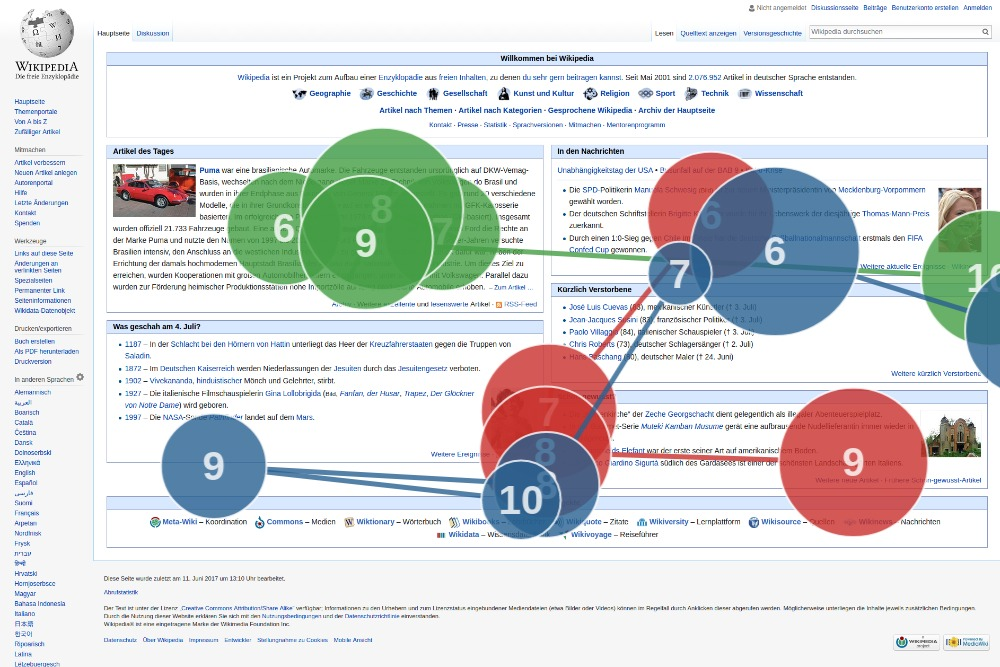
A gaze plot, like the one above this text (source: Wikimedia), shows each user's journey on a page based on what they focused on in turn. This gaze plot represents three different users, each in a different color (red, green, and blue). The larger the bubble, the longer the user focused on that part of the page.
The heat map below, on the other hand (source: Wikimedia), aggregates gaze data, so you can see one or many users' views at a glance. Red-colored areas are the ones focused on either more frequently or longer:
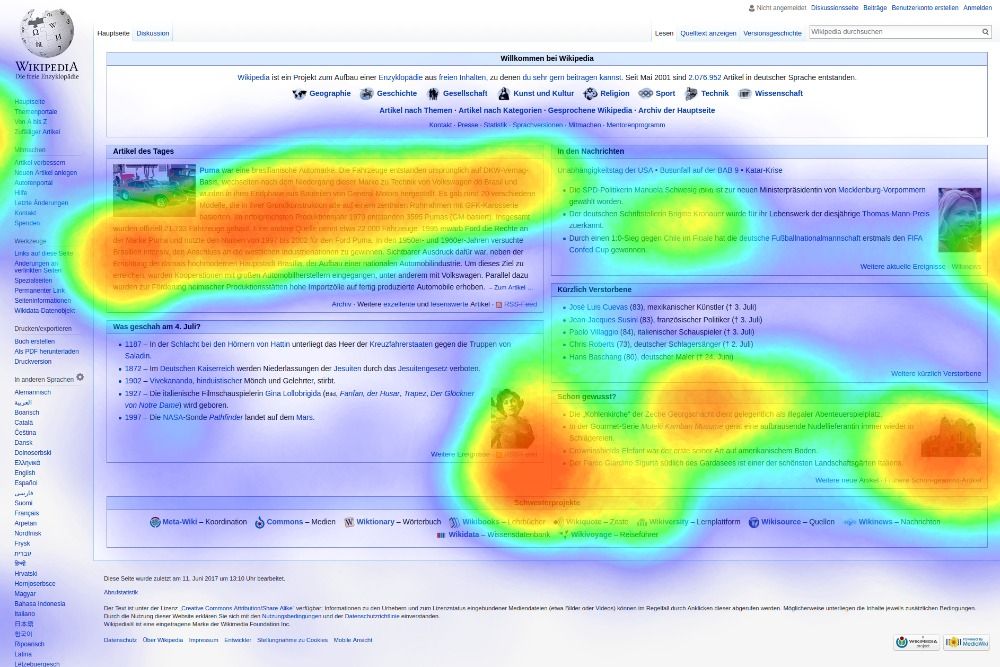
Eye tracking is useful when you need to learn about the unconscious behaviors of your users. It's particularly popular in marketing research. It can also be useful if you're designing novel interactions, like new interfaces for mobile devices or complex interfaces like the ones found in video games. When there's a high density of information to display, eye tracking can help you find which items on the screen are viewed the most or which ones take the longest to comprehend (based on where your users' eyes linger the most).
The drawback of eye tracking is that it is expensive and complicated. Often it is not necessary to use this method because there are other, simpler ways of analyzing user behavior. If you do need eye-tracking research done, you should consult with a company that has done this before in order to save the time, effort, and resources that would go into setting up this type of research from scratch.
Direct observation
One way to learn more about your users and your product is to simply watch people use it. You can ask questions about how they're using your product, learn more about the other interruptions outside your product that could affect its use, or just watch quietly and learn about your users' habits, the problems they encounter, and how they go about solving them.
For example, if you work on eBay's seller platform, you could watch a seller go about their day-to-day business, which may or may not include using eBay. You might learn that they're frequently interrupted by emails and other urgent issues, so they forget where they were when they return to your site. This context of a user's working environment is lost when you invite users to your office to test specific tasks, do interviews, or use other methods of research.
Observation studies are helpful when you need to understand how your product fits into someone's overall life. You can also use observation to learn about unexpected ways people use your product. For example, maybe that eBay seller always copies and pastes descriptions from other sellers because it's difficult and time-consuming to write new descriptions for every item. That piece of information could lead you to a product gap that needs to be fixed.
The drawback to observation is that doing user research this way can be extremely time-consuming—scheduling with users and patiently watching them use your product can take up a lot of your time. It usually requires you to be in the user's office, home, or another setting where they're using your product. Finally, keep in mind that people behave differently alone than when observed. Even though you're in their natural environment, you may not be seeing their natural, everyday behavior. Consider the benefits and drawbacks, and use observations only when the return on your investment of time and effort is expected to be significant.
Participant observation
This research method is borrowed from the field of anthropology. The idea behind it is that the best way to gain an understanding of your users is to become one yourself. When using this method, you go beyond observing users and participate in their activities.
For example, if you work on Square's cash register system, you can learn about the product by becoming a cashier in a Square-powered store for a day. By doing the work yourself, you'll have a greater appreciation for how the product works, and you'll be able to have more intelligent conversations with your product's users.
In a similar way, you could volunteer for work on your product's support team. Zappos, for example, requires all employees to spend several weeks on their support team when they start their job and each year on an ongoing basis. Volunteering in this way can help keep everyone humble about users and their problems. It can also give you, as a PM, access to insights about how you can make your product better.
Use participant observation when you need to create deeper understanding and empathy with the users of your product. This kind of observation also helps you build credibility with your team because you are more than an expert on your product—you're a user too. Participant observation is ideal in scenarios where your product has a low barrier to entry, like ones that require little training or expertise.
On the other hand, this method requires a lot of time spent as a user to get the most experience and understanding from the effort. It could also take you a while to find an opportunity to participate in this way. Similarly, you might only see a sliver of your users' actual experiences. Your day behind the Square cash register might not be a typical day in that store, or that store may not be a good representation of your users at large. Any conclusions you draw from the experience could be misleading. In many cases, direct observation is easier to accomplish and achieves better results since it's based on the experience of your actual users.
Diary studies
A diary study is a way of tracking people over a long period of time by having them record their observations on a regular basis. For example, you may want to understand how frequent Facebook users feel about their time using the application. You could have them answer a small set of questions about Facebook every few hours like these:
- When was the last time you used Facebook?
- What specifically did you do when you used it?
- How long did you use it?
- How did you feel afterward?
By tracking this over a long period of time, you can learn about peoples' sentiment for your product and behavior around your product. Academic diary studies (also known as experience sampling) often become the backbone of headlines like, "Using Facebook frequently will make you less happy."
Diary studies are performed by very large companies or research teams who are trying to understand products in the greater context of an individual's life. This is a very involved method of user research and requires significant time and effort to recruit people, keep them engaged (it's common for people to give up), analyze all the results, and pay moderators and participants.
In general, other user research methods are good enough for most product purposes. That said, you may want to use a diary study or something similar to it when you're working on products that are important in a daily context, like social media apps, health technology (such as a medications reminder), or other activities that have a daily effect on your users.
Choosing a research method
It's not always obvious what method of UX research you should use. If you have a UX team, the simple answer is to tell them the information you need and let them choose the best way. They are the experts.
If you're in a smaller organization and are doing the research yourself, you'll want to balance your time and company resources to get to answers in the fastest, cheapest way possible. Money and time are usually your largest constraints, and that means you'll focus on methods that similarly require little time and effort from your users.
For the best results, you should combine a couple of methods together to validate your conclusions. For example, you could do some direct observation of people ordering products on your website, then conduct interviews with other users to ask questions based on what you learned during your observations. Having that extra validation across research methods will ensure that your product is on the right track.
Practice ✍️
As mentioned at the top of this checkpoint, most PMs will not do this type of research themselves but will instead collaborate with UX teams who will choose the best method to deliver the information you need. The type of research activity you are most likely to be asked to actively participate in is a heuristic evaluation.
To practice this task—and further develop your user discovery and prioritization skills—do a heuristic evaluation of PMcademy's student experience. Use Neilsen's list; go through each heuristic and list any issues you discover. Prioritize the top three issues you found and explain why those are the most important issues to address.