21.1 BI Tools
As you've probably realized by now, data analysis can be difficult and time consuming. Thankfully, you don't always have to do all the work yourself. Many tools are available that connect data sources together and let you easily create reports, dashboards, and graphs. You'll probably use these business intelligence (BI) tools on a regular basis in your role as a PM.
In this module, you'll get some practice using one of the most popular data visualization and business intelligence tools today: Tableau. Adding Tableau to the list of software skills on your resume will give you a significant advantage in the job market. And even better, you'll be able to apply your Tableau skills to a project to impress potential employers with.
But first, this checkpoint will focus on business intelligence tools in general—what they're for and how they can help product managers do their job. Learning about this now will ensure that you're ready to use whatever BI tools your company has on the first day of your job.
By the end of this checkpoint, you should have learned how to do the following:
- Explain the core functions and purposes of the business intelligence stack of tools

What are BI tools?
Business intelligence tools are applications and services that can process large amounts of information, often from disconnected data sources, and combine them together for deeper insights into business metrics. For example, your web analytics alone give you some information about how your users behave. But if you combine your web analytics with data from your email marketing and advertising tracking, you might be able to see deeper trends, like how one ad campaign is much more successful at acquiring users than other ones.
Product managers use BI tools in a few different ways. For starters, BI tools accelerate data analysis. You recently learned some SQL, so you might have noticed how time consuming and error-prone it can be. With a BI tool, you can often create the report you want to see and have the tool automatically create and run the SQL needed to generate that report. This is a huge time saver, and it decreases the likelihood of making mistakes (which is common when writing your own SQL).
Watch this 7-minute tutorial from Looker, a BI tool that is especially popular with startups, to get a sense of the features and capabilities that BI tools offer a business user:
Source: Looker video on YouTube
BI tools can also help create graphs and other data visualizations out of the reports you make. And it can be really easy—for example, if you include a State field in your e-commerce report, your BI tool can take that data and project it onto a map.
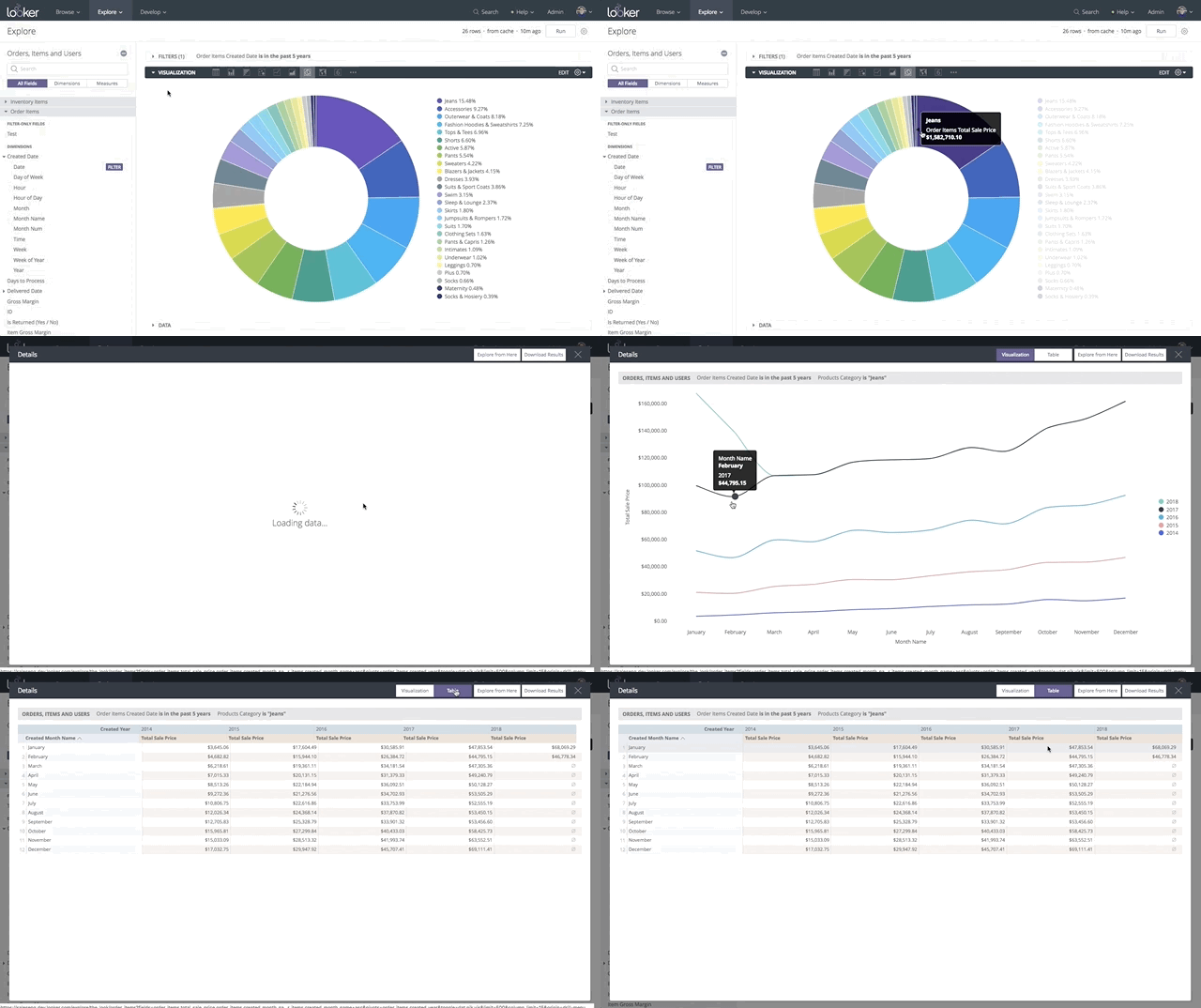
This also makes it easy to create dashboards. Many BI tools will let you save your visualizations onto a single page, so you can easily create a dashboard containing the most useful information without ever worrying about the details of how it all works. Some tools can even create interactive visualizations, where you can drill down in charts. You can see this in action in another Looker Demo embedded below:
So why did I learn SQL?
If BI tools can write SQL queries for you, why spend time learning SQL at all? First, because knowledge of SQL signifies to employers and coworkers that you have technical skills. This implies that you're capable of learning additional technical skills, which is something employers appreciate and look for.
Second, there will be times when BI tools won't be able to help you, meaning that the only way to solve your data questions will be to write your own queries. It's far better for you to build those queries yourself than to ask your developers or infra team to do it; the time it takes is time they are not using for other development tasks. In other words, it's worth your time to avoid interrupting your team and instead write your own SQL when you need to.
Finally, to really understand these BI tools and use them effectively, you need to know a bit about what they're doing under the hood. That means that you need to know how they translate your reports into SQL so that you can ensure that you're getting the right data back. While these BI tools are relatively easy to use, they can be misconfigured or have bugs that lead to the wrong answers. Knowing SQL means that you can check the results that you're getting from your tool, and avoid mistakes that will lead you down the wrong path for your product.
Common BI features
Most BI tools have a common set of features. Knowing what these tools can do will help you take advantage of their full capacity. For most BI tools, the following facts are true:
- They connect to a variety of data sources, allowing you to combine those data sources for your analysis.
- They are easy to update or they automatically update as your data sources change.
- They provide tools that make it easy to create reports and dashboards.
- They visualize reports, making it easy to view and share what you're learning from the data.
- They trigger alerts when certain metrics hit configured thresholds.
- They keep your database secure by masking or hiding sensitive data.
- They can generate scheduled reports, which is especially useful for reports that take a while to generate, or if you have daily data needs.
As a product manager, you could be asked to evaluate BI tools for your team to use. If that ever happens, consider the list of items above. You would want to choose a tool that does all of these things. Additionally, you'll need to pay close attention to whether or not the BI tool you're considering purchasing supports the databases and other data sources you and your team need, including your marketing and sales tools.
For the rest of this module, you'll learn how to use Tableau. The features included in Tableau are common across most BI tools, so knowing it will help you learn other BI tools in the future. And knowing Tableau is another hard skill you can use to showcase your technological ability to potential employers.
Practice ✍️
Spend up to 60 minutes familiarizing yourself and evaluating a few popular BI tools. Unlike most technologies you learned about in this program, BI tools usually don't have online free demo accounts. That's because to analyze data, these tools need to be connected to an actual product database. With no demo accounts, the best way to learn about these tools is exploring their marketing material, video tutorials, and online user communities and reviews.
Do some internet research about the five BI tools listed below:
In your notebook, make a quick summary of what you learned about each tool's capabilities, advantages, and limitations, and any lingering questions this brings up. And if your current employer is using any BI tools, brainstorm ideas for taking on work that will give you a chance to explore them in more depth.